1311 Handheld Programmer1311 Handheld Programmer
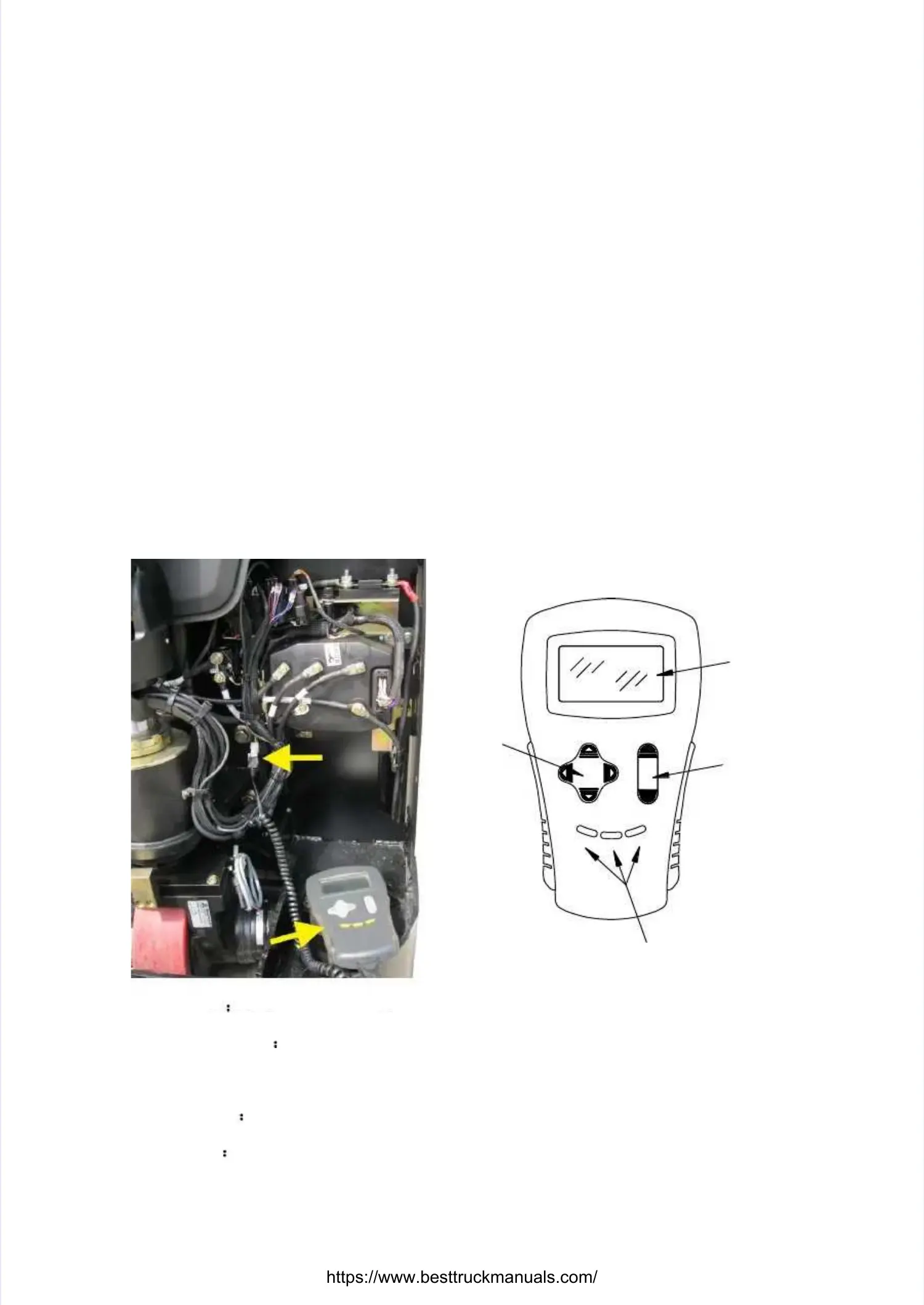
1311Handheld Programmer is a handheld tool that allows user programming, testing and1311Handheld Programmer is a handheld tool that allows user programming, testing and
diagnosing the traction motor controller, refer to the following picture. Program setting handhelddiagnosing the traction motor controller, refer to the following picture. Program setting handheld
terminal owns one menu navigation key, one data Inc/Dec key and three bookmark keys toterminal owns one menu navigation key, one data Inc/Dec key and three bookmark keys to
control all control all programmprogrammable functions.able functions.
Display window includes a seven-line 128 × 64 pixel LCD screen, this screen can show the testDisplay window includes a seven-line 128 × 64 pixel LCD screen, this screen can show the test
and pictures at the same and pictures at the same time, visible in the lightest condition, and adjust program to set time, visible in the lightest condition, and adjust program to set menu.menu.
Program is driven by the menu, and enters the next menu by pressing menu navigation button.Program is driven by the menu, and enters the next menu by pressing menu navigation button.
When the program is connected to motor controller, all motor controller information uploads toWhen the program is connected to motor controller, all motor controller information uploads to
the handheld programmer.the handheld programmer.
22
33
11
DISPLAYDISPLAY
SCREENSCREEN
DATADATA
INC/DECINC/DEC
KEYKEY
MENUMENU
NAVIGATIONNAVIGATION
KEYKEY
BOOKMARKBOOKMARK
KEYSKEYS
Display screenDisplay screen
Move the cursor on the screen up or down to pass the menu list(up orMove the cursor on the screen up or down to pass the menu list(up or
down arrow),open or close submenu(right or left arrow)down arrow),open or close submenu(right or left arrow)
Data Inc/Sec keyData Inc/Sec key
Three bookmarThree bookmark keys allow you k keys allow you to return fast or to return fast or reach your favor or often usereach your favor or often use
menu interface without through themenu interface without through themenu navigation. Press on the relevant bookmark button for 4menu navigation. Press on the relevant bookmark button for 4
seconds, it can store seconds, it can store relevanrelevant menu interface to this t menu interface to this button. Press the relevant bookmark keybutton. Press the relevant bookmark key, it, it
can skip to can skip to the corresponding menu interface of your chosen the corresponding menu interface of your chosen bookmark. Abookmark. After close thefter close the


 To Next Page