11
English
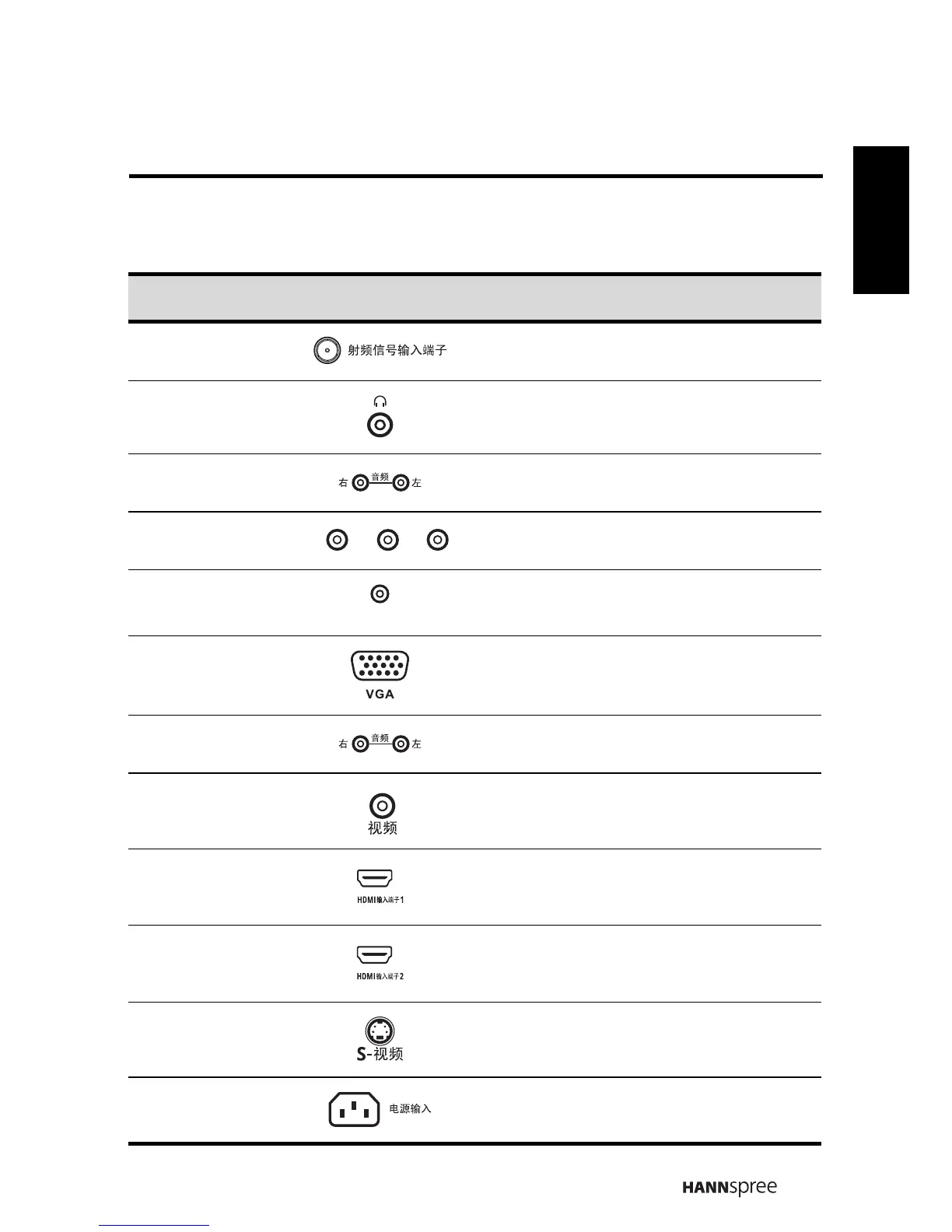
1.5 Input and Output Jacks
Description Connector Function
Cable/Antenna Connect to an antenna or cable TV.
Earphone Output
Connect to earphones or external
speakers with built-in amplifier.
Component
Inputs (audio)
Connect to an external device, such as a
VCR, STB, or a DVD player.
Component
Inputs (Video)
Connect to an external device, such as a
VCR, STB, or a DVD player.
PC Audio Input Connect to a PC’s line / audio port.
VGA (PC) Input Connect to a PC’s VGA port.
Video/S-Video
input (audio)
Connect to an external device, such as a
VCR, STB, or a DVD player.
Video
Connect to an external device, such as a
VCR, STB, or a DVD player.
HDMI 1 Input
Connect a HDMI equipment or an HDMI-
DVI adapter cable to devices such as a
DVD player or STB.
HDMI 2 Input
Connect a HDMI equipment or an HDMI-
DVI adapter cable to devices such as a
DVD player or STB.
S-Video
Connect to an external device, such as a
VCR, STB, or a DVD player.
Power Connector Connect to the included power cord.
Y
P
B
P
R
PC LINE IN



 To Next Page