12
English
1.6 Remote Control
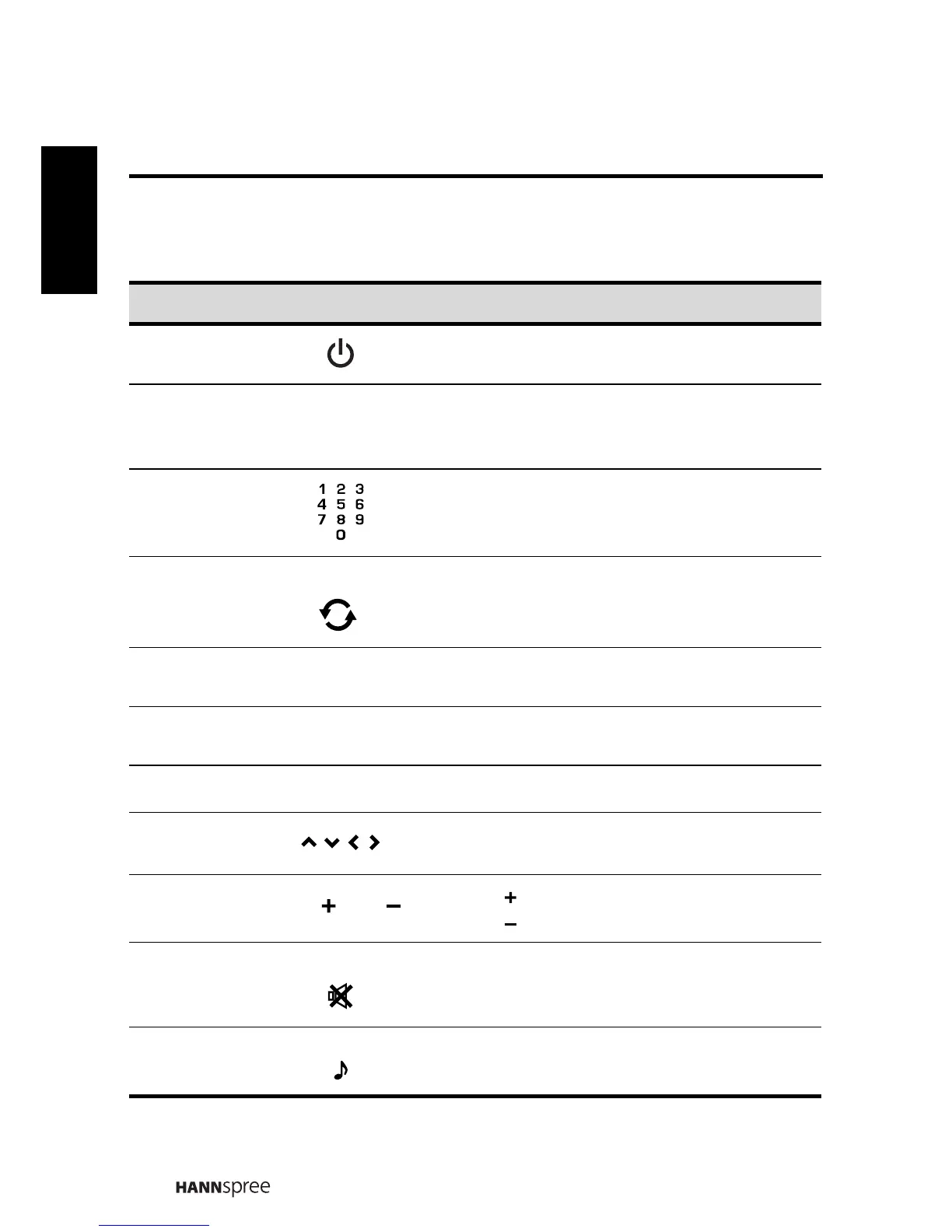
Description Icon Function
Power Press to turn the TV on or off.
Input Signal
Type
Press to select the input signal type selection:
TV, AV, S-VIDEO, HDMI1, HDMI2, YPbPr or
PC.
Keypad
Use to select a program directly. Press 0-9 to
enter the program numbers (press 1 and 0 for
program 10).
Last
Press to return to the last channel selected.
(TV only)
Information
Press to display current channel/ program
information.
Menu
Press to turn the on-screen display (OSD)
menu on / off.
OK OK Press to confirm selection.
Arrows
Press up, down, left or right to scroll through
the on-screen display menus.
Volume adjust
Press to increase audio volume.
Press to decrease audio volume.
Mute
Press to eliminate sound. Press it again or
press the volume adjust buttons to restore
sound.
Dual sound
Press to change the multi sound selection of
the TV channel.
ֵো⑤
᳔ৢ
ᰒ⼎
㦰
䷇䞣 / ䷇䞣
䷇䞣
䷇䞣
䴭䷇
䷇എߛᤶ






 To Next Page