13
English
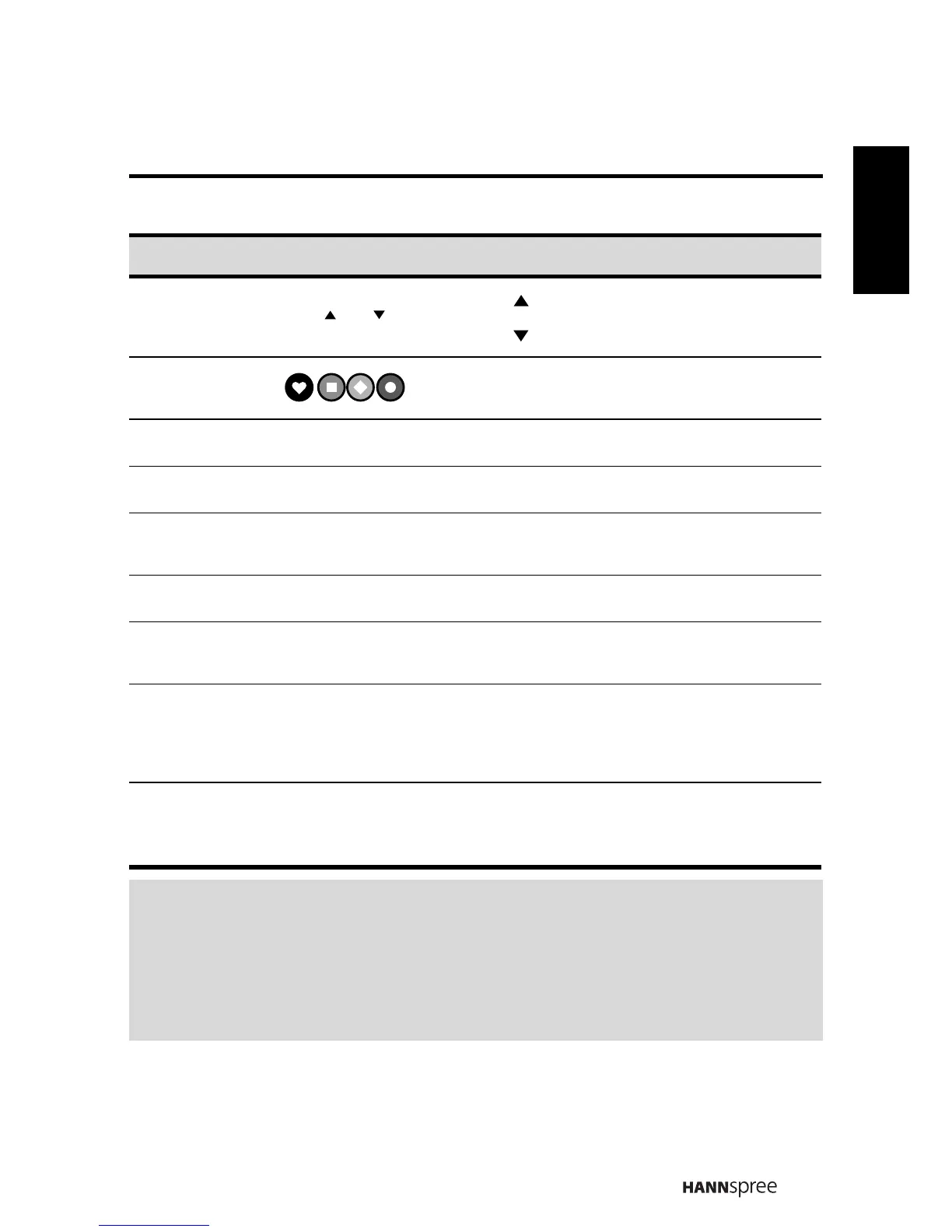
Select
program
Press to increase the program number.
Press to decrease the program number.
Red, Green,
Yellow, Blue
Press the colored buttons to perform specific
tasks in the OSD menu. (TV only)
TV Press to select the TV input signal source.
AV / SV Press to select the AV / SV input signal source.
YPbPr
Press to select the component input signal
source.
HDMI HDMI Press to select the HDMI input signal source.
Favorite
channel
Press to select favorite channels. (TV only)
Sleep timer
Press repeatedly to set the sleep timer (
15, 30,
45, 60, 90 or 120
minutes).
Cancel the timer by selecting the Sleep Off
option.
Aspect
Press to change the aspect include Auto, Full,
Normal, Panorama, Zoom, Subtitle, and Wide
mode.
Note:
• For best results, use the remote control within a proper distance from the
front of the TV. Do not exceed an angle of 30 degrees when pointing at TV.
• The operational distance may be shortened when the signal sensor is
directly exposed to strong light.
• Aim the transmitter on the remote control at the signal sensor and ensure
that there are no obstacles between them.
Description Icon Function
㡖Ⳃ /㡖Ⳃ
㡖Ⳃ
㡖Ⳃ
⬉㾚
㾚乥
ߚ䞣
୰ད
ⴵ
↨՟




 To Next Page