27
English
• Channel can be used to select channels by pressing
/
.
• The Colour System can be set to Auto, NTSC, PAL, and SECAM.
• The Sound System can be set to Auto, BG, DK, I.
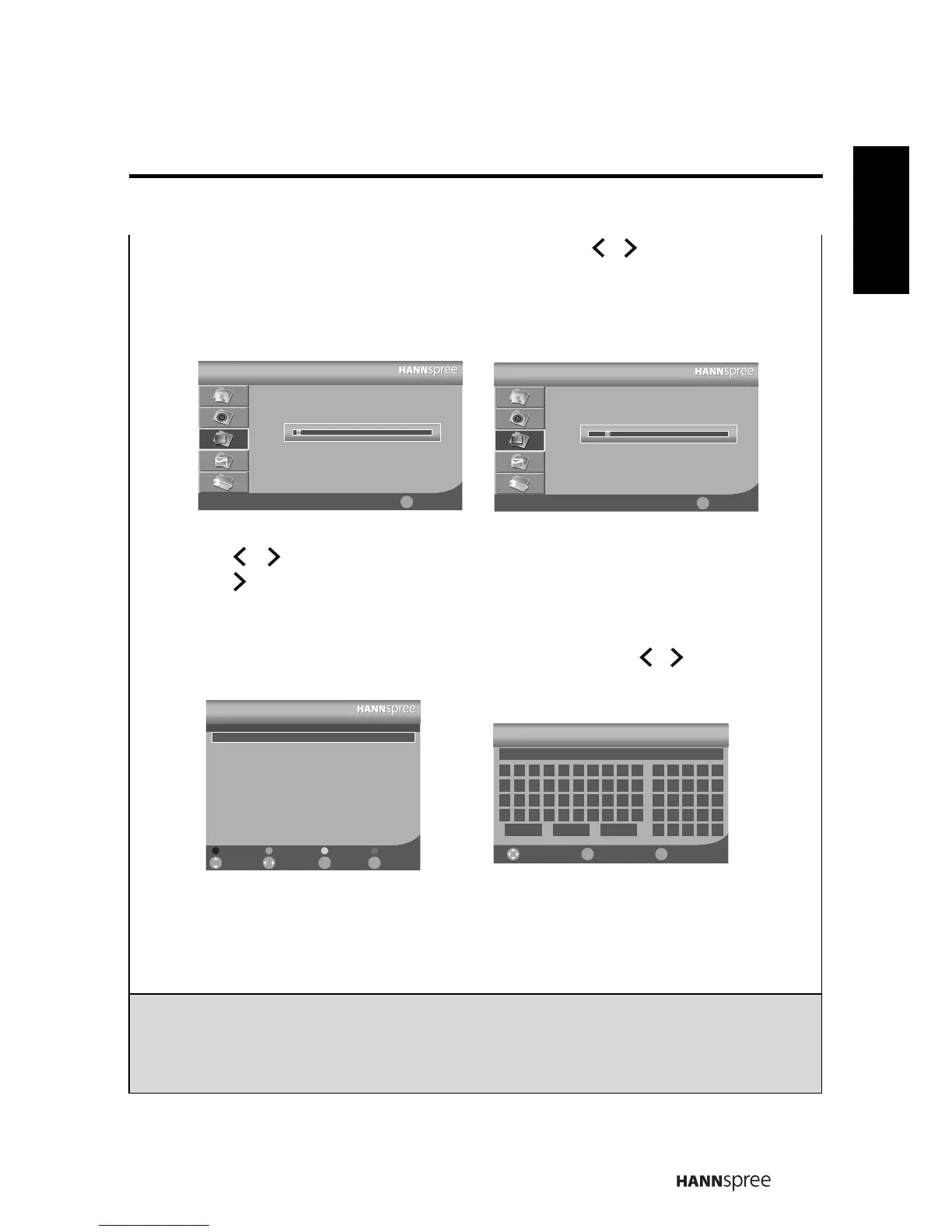
• Select Auto Search to activate the automatic TV channel search. Select Manual
Scan to search the TV channels manually.
• The AFC Lock can be set to On or Off.
• Press
/
to adjust the channel frequency in Fine Tune.
• Press to enter the Channel Edit menu, the Channel Editor allows you to edit
the detailed items, including Skip, Del, Swap, Lock, Rename, and Fav for each
channel.
- To change the channel name, select the channel and press
/
to open Channel
Editor. Input the channel name you prefer using the on screen keys and select Save.
- Press the Red button on the remote control to skip the channels.
- Press the Green button on the remote control to delete the channels.
- Press the Yellow button on the remote control to swap the channels.
- Press the Blue button on the remote control to lock the channels.
- Press the 喜好 button on the remote control to add favorite channels.
Note:
• The Channel Settings are only available in TV mode.
• The TV system can only support PAL, NTSC BG/DK, SECAM BG/DK.
• If the selection of the Colour or Sound system is not correct, it will cause the
abnormal status of the Video and Audio.
Auto Search
Channel
63.55 MHz
1
Exit
ᚚת
Manual Search
Channel
144.95 MHz
1
Exit
ᚚת
Channel Editor
1
2
3
4
5
6
7
8
9
10
223.25
223.25
235.30
241.30
259.25
271.25
277.25
283.25
289.30
301.30
- - -
- - -
- - -
- - -
- - -
- - -
- - -
- - -
- - -
- - -
Off
Off
Off
Off
Off
Off
Off
Off
Off
Off
Fav. LockSkipNameFrequencyChannel
Select ReturnFav.Move
Del LockSwapSkip
Fav.
ᚚת
~][}{
!)(><
^%$#|
-*&+=
,";:_
0 987654321
a jihgfedcb
k tsrqponml
u /\?@zyxwv
Save Caps Del
Channel Editor
ReturnEnterMove
Ok
ᚚת





 To Next Page