9
INITIAL INSTALLATION
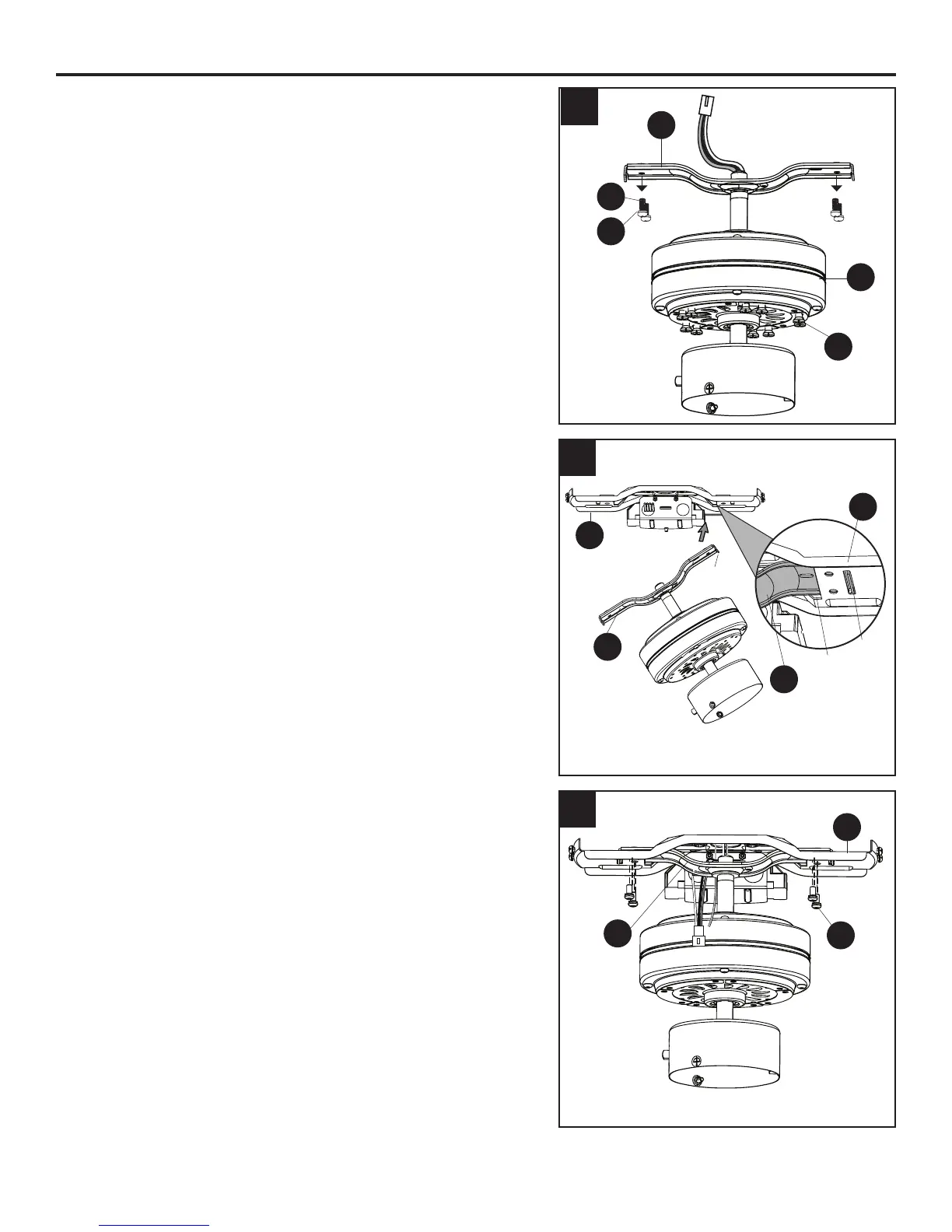
7. Remove the mounting bracket screws (R) and spring
washers (W) from underneath the lower mounting
bracket (D). Also remove the motor screws (V) from the
bottom of the motor (E). Retain for later use.
Note: Make sure to keep loose hardware separate to
avoid confusion during installation.
8. Place one tab of the lower mounting bracket (D) into a
slot in the upper mounting bracket (B). Then slide the
second tab of the lower mounting bracket (D) into the
second slot on the upper mounting bracket (B) until all
four holes are in alignment.
9. Re-install the previously removed mounting bracket
screws (R) and spring washers (W) to secure the
lower mounting bracket (D) and the upper mounting
bracket (B).
5
6
9
8
7
R
W
V
E
D
R
B
D
B
B
D
Tab
Tab
Slot
D



 To Next Page