Page 15 of 2
8
•
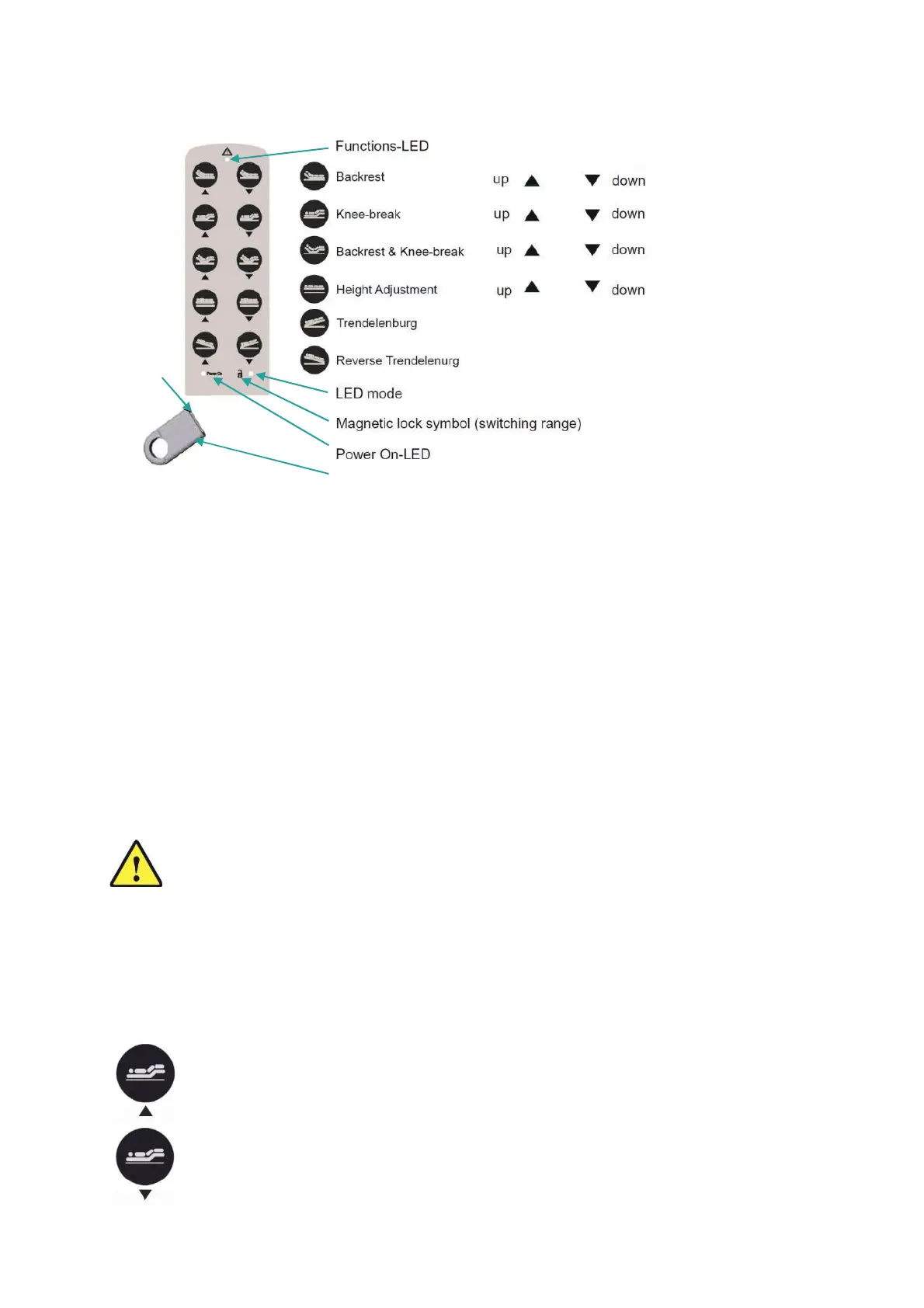
To put the handset into operation, connect it to the control unit. The keypad of the
handset is completely blocked. The LED next to the padlock symbol does not glow.
•
Passing the magnetic side of the magnetic fob once over the padlock symbol releases
the handset adjustment functions except the Trendelenburg function. The LED next to
the padlock symbol glows green
•
Passing the magnetic side of the magnetic fob over the padlock symbol once again,
enables the Trendelenburg function. The LED next to the padlock symbol glows orange.
•
If no key is pressed after approximately 45 seconds of the handset not being used it will
automatically lock.
Caution:
Keep the handset away from magnetic objects and strong magnetic fields as
this may cause the handset to lock or unlock.
Magnetic
side
Magnetic key
Figure 12: 10-button handset
Functions of the locking device
By passing the magnetic side of the magnetic key over the padlock symbol
,
three modes can be
released or blocked.
10-button handset8.1
9. Bed Adjustments
Knee-break section adjustment
9.1
To raise the knee-break section of the bed, press and hold the Up Knee-Break
Adjustment Button on the handset to reach the desired position.
To lower the knee-break section of the bed, press and hold the Down Knee-Break
Adjustment Button on the handset to reach the desired position.


 To Next Page