Page 31
BCS6000C-9
APPENDIX I: DRAFT TRANSMITTER ADJUSTMENTS
The NEXT and ENTER buttons located below the LCD display may be used to adjust or
reconfigure the draft transmitter if required. Wait one or two seconds between each button
press to allow the display to update.
ZEROING
Allow the unit to warm up for at least five minutes before adjusting the transmitter zero. Refer to
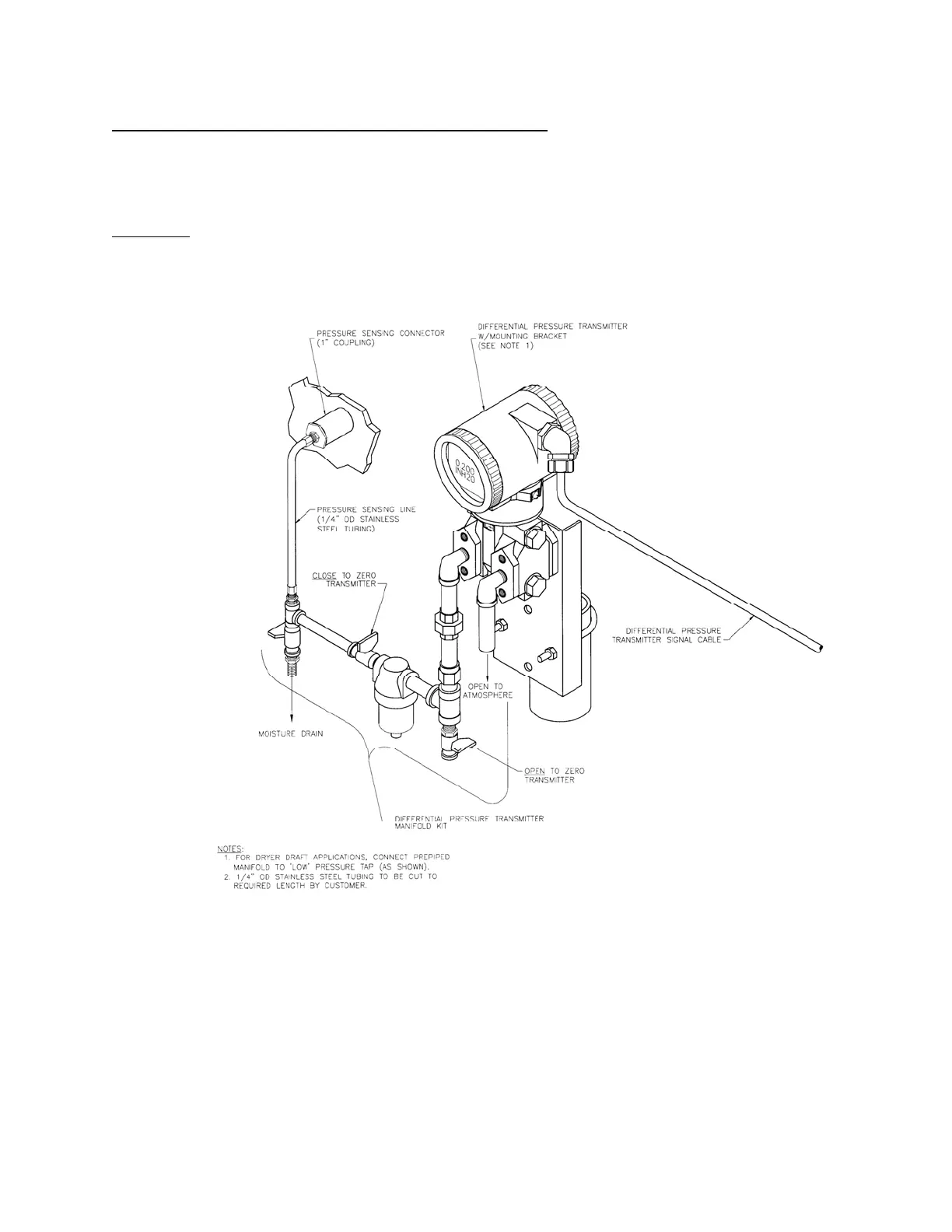
Figure 1 and use the shutoff cocks in the transmitter manifold to isolate the transmitter from the
dryer and to open the LOW pressure tap to atmosphere.
Figure 1. Transmitter and Manifold Layout
If the transmitter display does not read 0.00 IN H2O use the following procedure to zero the
transmitter.
Press the NEXT button one time to change the lower display to CALIB.
Press ENTER to change the lower display to CAL AT0.
Press ENTER and the lower display will read AT0 DONE.
Press NEXT to step through the remaining calibration options until the lower display
reads SAVE.
Press ENTER to save the new zero calibration and exit the calibration mode. Note that
W7450
(NOT TO SCALE)


 To Next Page