Page 38
BCS6000C-9
APPENDIX K: AUXILIARY ANALOG INPUT
A spare analog input module in slot 1 of the PLC rack can be used to display the value of a
auxiliary 4-20mA or 0 to 5 Vdc signal.
Temperature inputs will require the use of a thermocouple transmitter. Hauck part number
401797X001 is configured for a type J thermocouple with a range of 32 to 842
F. Consult the
factory for other thermocouple types or ranges.
NOTE: If the signal applied to terminal 88 is 4-20mA, the 250 Ohm resistor installed between
terminals 88 and 81 must be left in place. Remove this resistor if the input signal is 0-5Vdc.
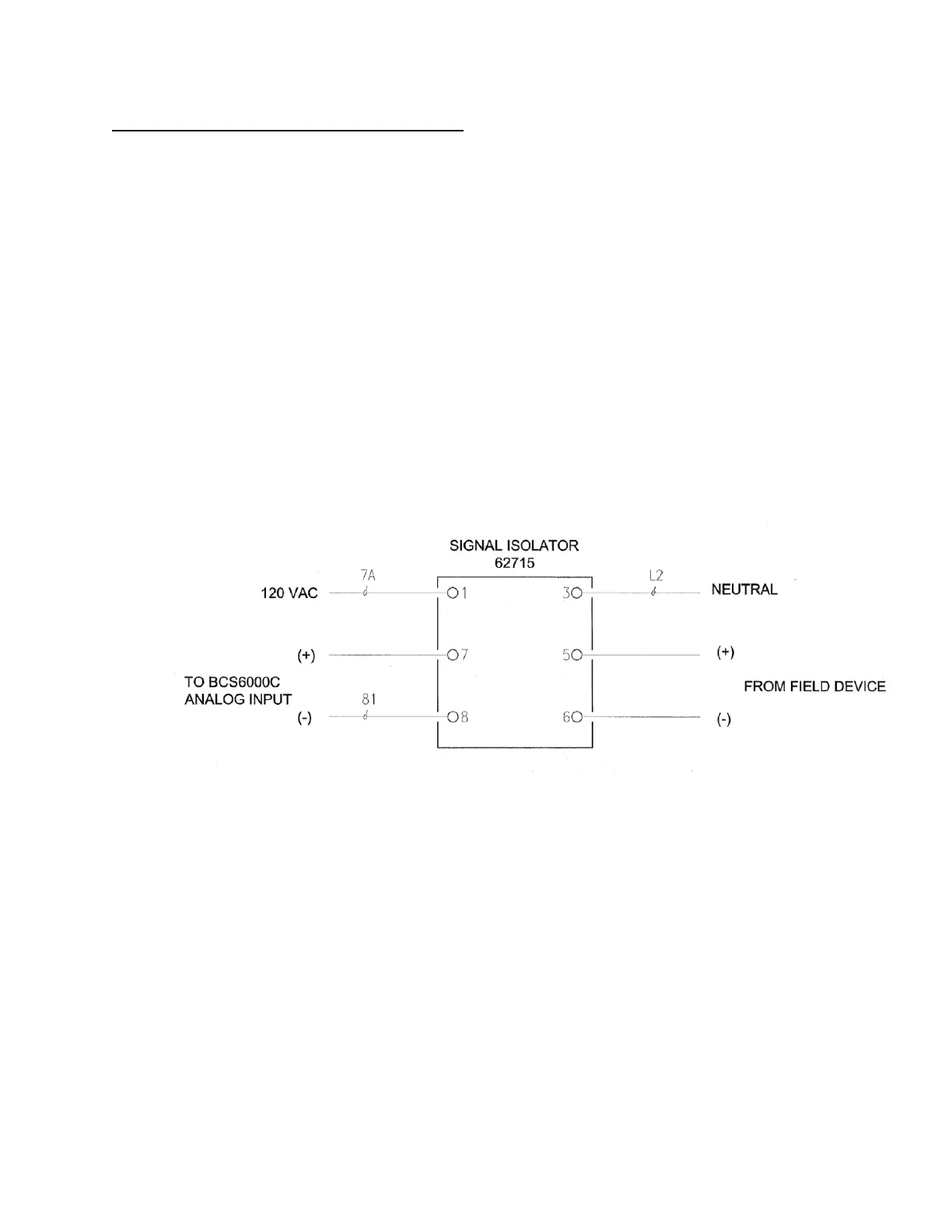
CAUTION: Interaction between power sources and/or supplies can interfere with the analog
signals of the BCS 6000 control system. Therefore, a Signal Isolator (Hauck part number
62715) is recommended for any input signal that is not powered by the BCS 6000 panel. The
output of the isolator should be set for 0-5Vdc. The input may be configured to accept any of
the following signals:
0 to 50mVdc 0 to 100mVdc 0 to 200mVdc
0 to 500mVdc 0 to 1Vdc 0 to 2Vdc
0 to 5Vdc 0 to 10Vdc 1 to 5Vdc
+/- 5Vdc +/- 10Vdc 0 to 20mA
0 to 1mA 4 to 20mA
Setup:
1. Access the configuration screen. Password = 2701940
2. Press the AUX IN button to change it from OFF to ON.
3. Press the TYPE button if necessary to toggle between 4-20mA and 0-5 Vdc.
4. Press the NAME FOR AUXILIARY INPUT box and enter a name for the auxiliary
input (maximum 14 characters).
5. Press the UNITS box and enter the desired units (Maximum 4 characters).
6. Press the ZERO box and enter the value represented by 4 mA or 0 Vdc.
7. Press the SPAN box and enter the value represented by 20 mA or 5 Vdc.


 To Next Page