Start-Up
22
Saving the prole
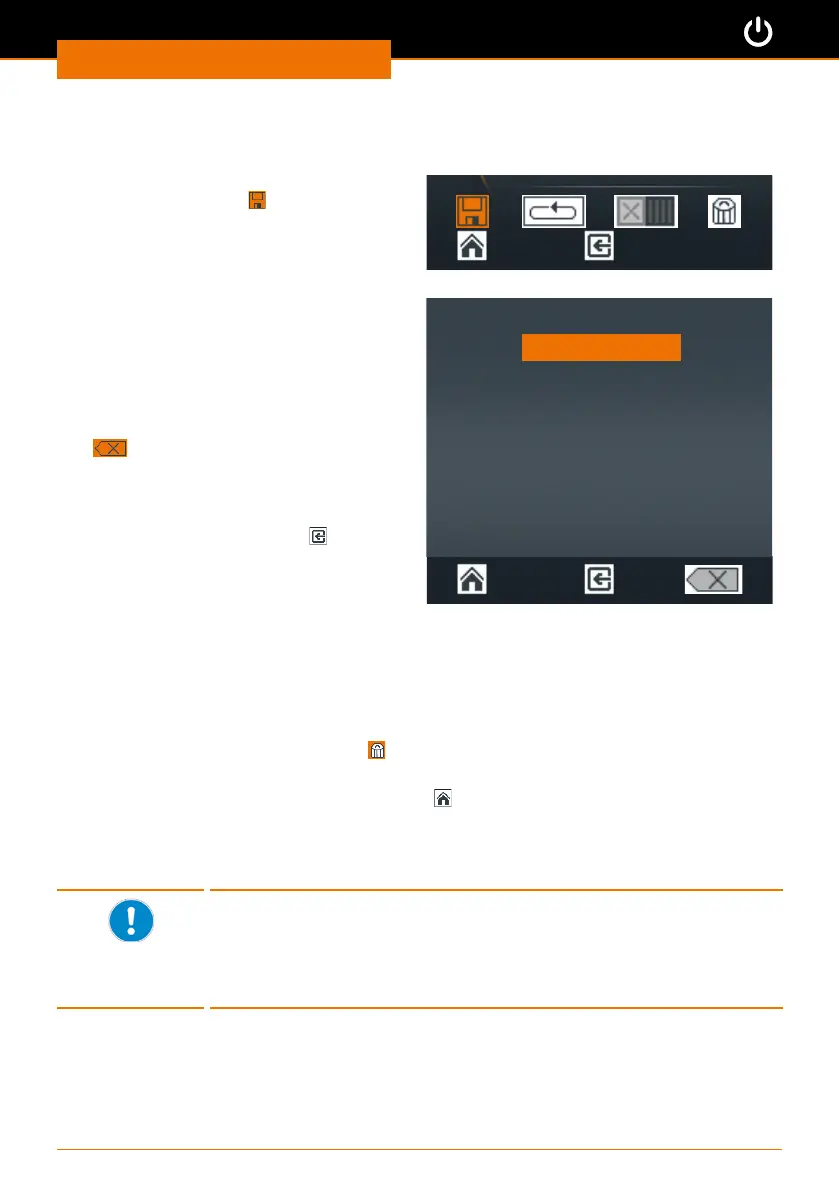
Once all prole steps have been completed:
➜ Turn the control knob counterclockwise
until the Save icon
at the bottom of
the display is displayed in orange.
➜ Push the control knob to conrm your
selection.
✓ An alphanumeric keypad appears to
allow you to enter your favorite.
➜ Choose a letter or number by turning
the control knob.
➜ Push the control knob to conrm your
selection.
➜ Delete mistakes using the Delete icon
.
➜ Save your selection by pressing “OK”.
✓ The conrmation message “Data
saved” is displayed briey.
➜ Exit the menu by pressing
to enter
another favorite.
Enter name:
A B C D E F G H I J
K L M N O P Q R S T
U V W X Y Z _ 0 1 2
3 4 5 6 7 8 9
OK
✓ The last prole saved is displayed as a template.
➜ Adjust the settings and save the prole under a new name.
If you want to change the gear stage for the next prole:
✓ The last prole saved is displayed as a template.
➜ Select and conrm the Delete icon
✓ The last prole saved is deleted from the template and a blank menu is displayed.
➜ Exit the menu by pressing the “Home” key
.
➜ Select a dierent gear stage from the main menu.
➜ Return to the “Edit prole” menu.
➜ Now you can enter a new prole with a changed gear stage.
▪ A prole can only be saved with either gear stage I or II.
▪ The gear stage for the prole needs to be selected from the main
menu.
▪ If you wish to use a prole with gear stage I (or II) as the
template for a new favorite, the new prole also has to be entered
in gear stage I (or II).



 To Next Page