Operation
29
Rotation Hei-TORQUE Precision: Additional
functions
Safety settings
✓ You have adjusted acceleration to the specic viscosity of the probe in use.
✓ You have set a speed limit, if required.
✓ You have set a torque limit, if required.
(See chapter “Start-up, Safety settings”)
Setting the rotation time
▪ The time can be adjusted from 1 minute to 24 hours.
▪ Display of the program is accurate to the closest second.
➜ Select “Timer”.
➜ Push the control knob.
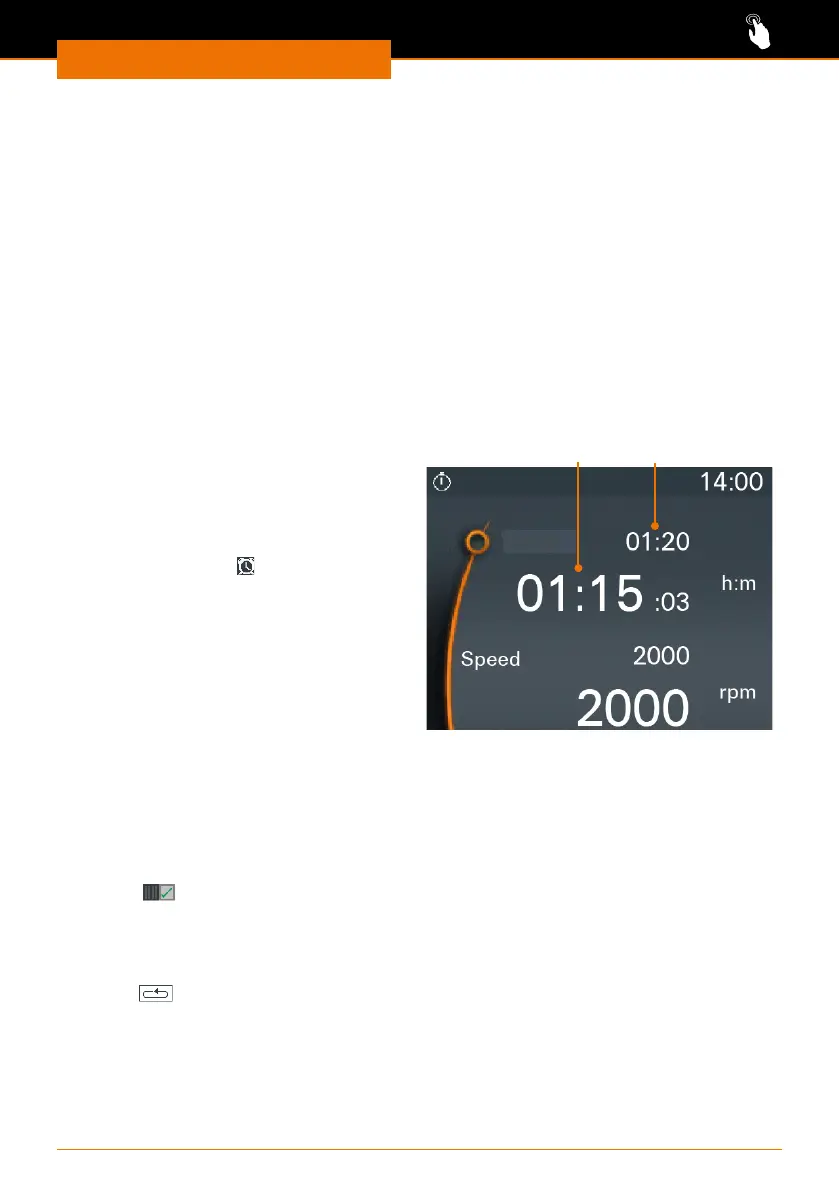
➜ Set the duration of rotation while the
settings are displayed in orange.
➜ Start rotation using the slider.
✓ The clock symbol
is displayed at the
top of the display.
✓ The scale below the set time indicates
the remaining time.
✓ Regardless of the set time, stirring
can be stopped at any time using the
slider.
Set timeRemaining time
Timer
Starting rotation via favorites
There are two ways to start a saved prole:
▪ Single operation
▪ The prole runs once on the basis of the set time.
▪ Rotation stops automatically as soon as the program is
nished.
▪ The prole icon is displayed at the top of the display.
▪ Continuous
operation
▪ The prole runs until the end of the cycle.
▪ Once the cycle is nished, it starts again.
▪ The stirrer continues running until the prole is stopped
manually.


 To Next Page