Operation
37
RS232 interface
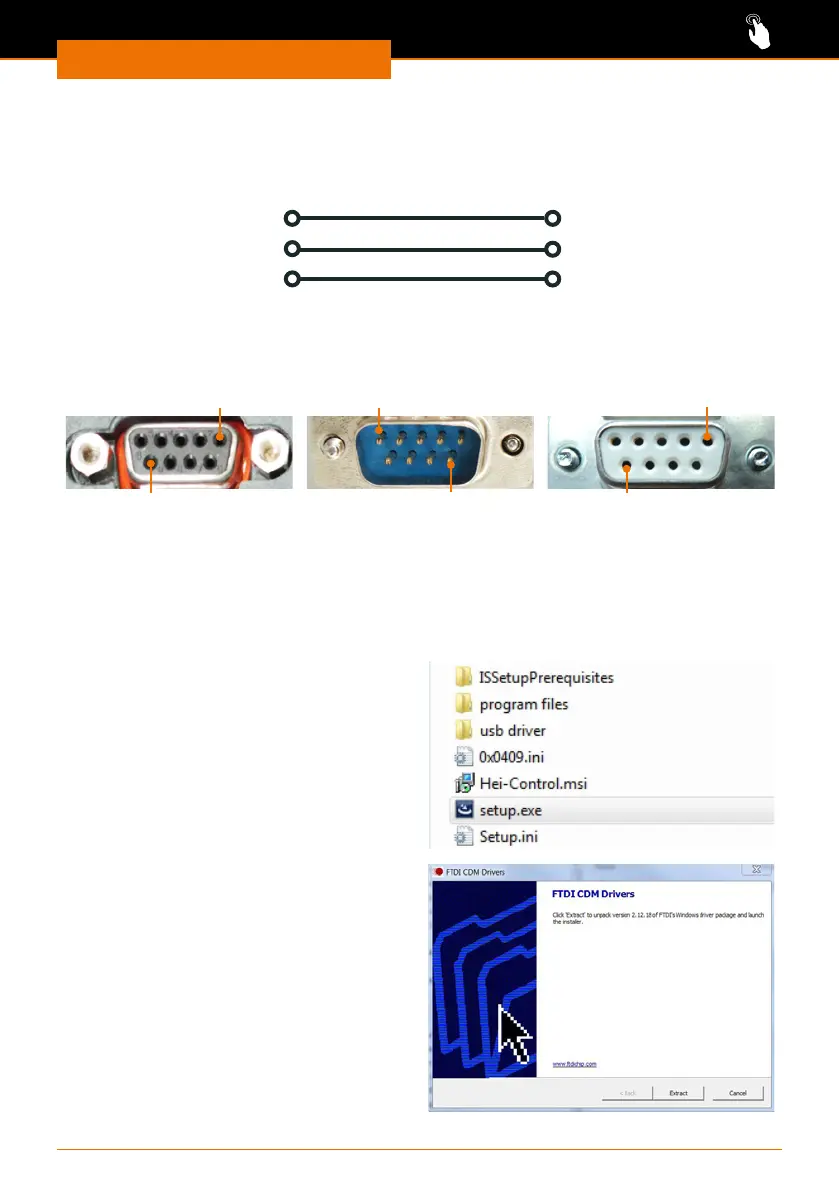
If you are using an interface cable not supplied by Heidolph (optional accessory) please
ensure correct pin allocation. The RS232 cable may only be connected as shown below:
SUB D9 plug
RXD (2)
TXD (3)
GND (5)
SUB D9 socket
(2) RXD
(3) TXD
(5) GND
Pin assignment
SUB D9 plug
Device connection
SUB D9 socket
Cable to device
SUB D9 socket
Cable to PC
1
9
1
9
1
9
USB interface
To operate a Hei-TORQUE stirrer via the USB interface, an additional driver needs to be
installed on your PC. The driver will simulate a COM interface.
You will nd the driver on the USB stick supplied.
➜ Plug the USB stick into your PC’s USB
interface.
✓ The folders and les shown on the
right are displayed.
➜ Open the “USB driver” folder.
➜ Double click “CDM v2.12.06 WHQL
Certied”.
➜ Follow the instructions on the screen.
➜ Press “Next” to accept the le location,
✓ The driver can be found in the folder
for Windows drivers.
➜ Click “Finish” to complete installation.



 To Next Page