09
support@heimvision.com
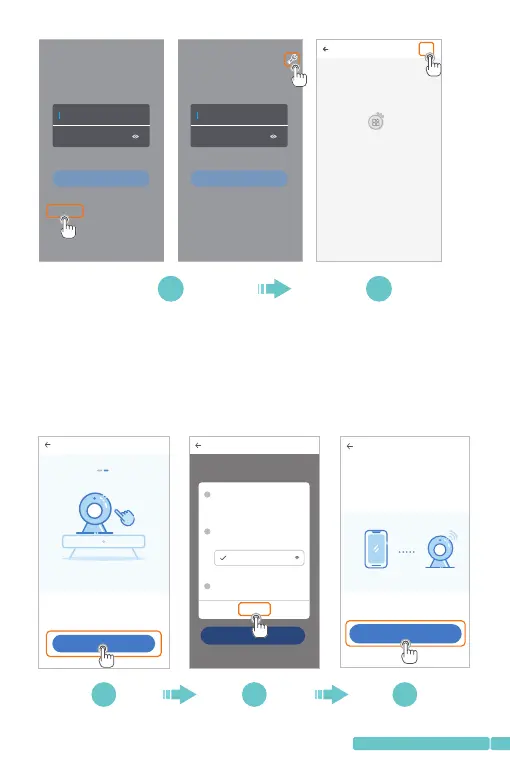
Step2:
TapNext.Therewillbeapop-upwindowandtapOKtoenter
theNetworksettinginterfaceoftheApp.TapGotoSettingto
enterthenetworksettinginterfaceofthemobiledevice;
Network setting
1/3
How t o conne ct the de vice>
Go to Sett ing
1
2
3
confirm
Go to t he sett ing pag e to star t the Wi- Fi
fun ction o f the mob ile dev ice
Start the de vice Wi-Fi
In Wi -Fi lis t, choo se and co nnect t o
"PI XPLUS _AP_X XXX" ne twork
Choose Wi- Fi for the device
Return to Pi xPlus APP
PIX PLUS_ AP_XX XX
AP networking devi ce p. ..
Che ck the vi deo by us ing the n etwor king pr eview t ool of
AP ho t poin ts of th e devi ce.B efor e the use ,ensu re tha t
the m obile p hone ha s been co nnect ed with t he devi ce
sup porti ng AP mode
2. Ke ep pres sing "S ET" or "R ESE T" key, f or at
lea st 5 seco nds
Next
Network configuration
1/3
The d evice w ill sta rt Wi-F i with "P IXPLU S_AP_ XXXX"
fie ld. Cli ck the bu tton in t he lowe r part to t he sett ing
int erfac e for con necti ng to thi s Wi-Fi
How t o conne ct the de vice>
Go to Setting
3 4 5
Hi,
You are welcome
Email address
Password
Sign Up Forget p assword
Log in
Local login
Hi,
You are welcome
Email address
Password
Sign Up F org et pas swo rd
Log in
Log in with mobile phone number
+
YCC36 5 Plus
Nodev iceinfo rmatio n
1 2


 To Next Page