Step4:
Afterthescanningissuccessful,entertheaccountname
PixPlusandpassword123456,thentapNexttostartto
connectthecamera.Youcanwatchthelivevideoandsetup
thecameraafterasuccessfullyconnection!
10
support@heimvision.com
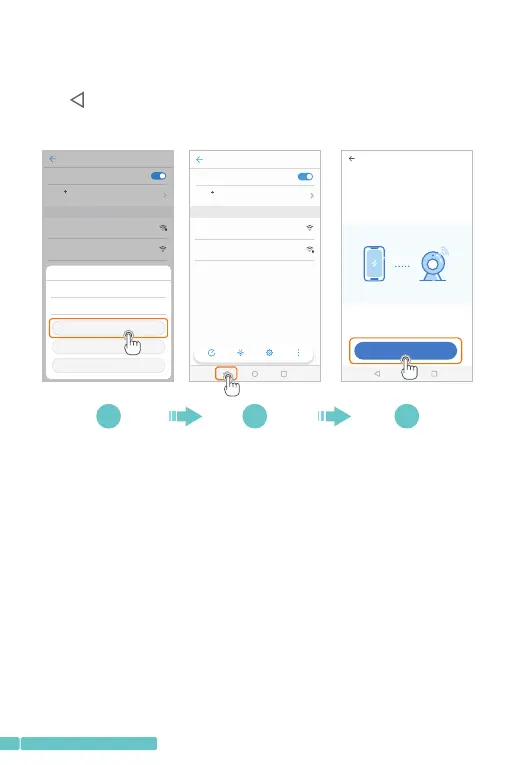
Step3:
ConnecttothePIXPLUS_AP_XXXXWi-Fi.Afterconnected,
taptogetbacktoPixPlustoentertheNetworksetting
interface,thentapNexttoenterascanninginterface;
WLAN
WLAN
WLAN
Off
AVAIL ABLE N ETWO RKS
HeimVi sio n
Enh anced I ntern et expe rience
Con nected
PIXPLUS_A P_1 46b 9c7cbe76
Sav ed,en crypt ed
Scan WLAN D irect Conf igure More
Off
WLAN
WLAN
WLAN
AVAIL ABLE N ETWO RKS
HeimVi sio n
Enh anced I ntern et experie nce
Con necte d
PIXPLUS_A P_1 46b 9c7cbe76
Sav ed
Network setting
1/3
Set t he WiFi t hat has b een con necte d with th is devi ce
How t o conne ct the de vice>
Next
PIXPLUS_ AP_ 146b9c7cbe76
Exc ellen t
Non e
Signal stre ngt h
Encryptio n Type
CONNECT
FORGET
CANCEL
6 7 8


 To Next Page