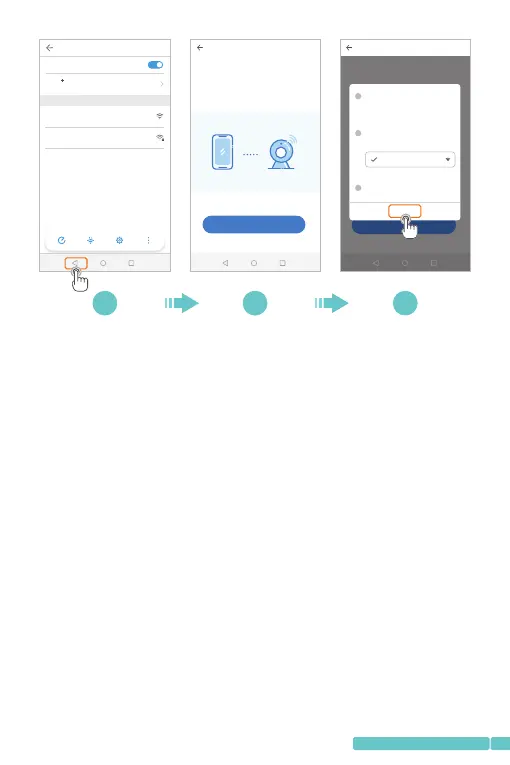
Tips:
1.Therewillbeapop-upwindowifthePIXPLUS_AP_XXXX
Wi-Ficonnectionisfailed.TapConfirmtoconnectagain;
2.IfyoustillcannotconnecttothePIXPLUS_AP_XXXXWi-Fi,
itmaybeprohibitedbythesecuritysettingofyourmobile
device.Pleasechangeyoursettingorcontactwithus.
Step5:
SelecttheWi-Fiyourmobiledeviceisconnected,enterthe
correctpassword,thentapConfirm.Thecamerawill
connecttotheInternetafter2beepsfromthecamera.
Duringtheprocess,youwillhear"Networkconnecting,
pleasewait".Whenyouhear"Wi-Ficonnectionsuccess.
Cameraisonline",thecameraisconnectedtoPixplus
successfully.
Network configuration
1/3
Set the Wi-Fi that has been connected with this device
How to connect the device>
Next
7 8 9
WLAN
WLAN
WLAN
Off
AVAILABLE NETWORKS
HeimVision
Enhanced Internet experience
Connected
PIXPLUS_AP_146b9c7cbe76
Saved,encrypted
Sca n WLA N Direct Con figure Mor e
Network configuration
1/3
How t o conne ct the de vice>
Next
1
2
3
Confirm
Go to the setting page to start the Wi-Fi
function of the mobile device
Start the device Wi-Fi
In Wi-Fi list, choose and connect to
"PIXPLUS_AP_XXXX" network
Choose Wi-Fi for the device
Return to PixPlus APP
PIX PLUS_ AP_XX XX
07
support@heimvision.com


 To Next Page