EasyManua.ls Logo

HeimVision HM243 - Hard Disk Drive Installation; HDD Installation Steps; HDD Requirements and Notice

HeimVision HM243
167 pages
Print Icon
To Next Page IconTo Next Page
To Previous Page IconTo Previous Page
Loading...
6
HARD DISK DRIVE INSTALLATION AND SYSTEM
CONNECTIONS
Hard Disk Drive Installation
Notice:
To record video and play the recorded video, the installation of the Hard Disk Drive
is a must. Otherwise, you can only watch the live picture.
A Hard Disk Drive is not included in this NVR System.
This NVR system works with a 3.5” SATA HDD. The HDD should be formatted if it’s
installed.

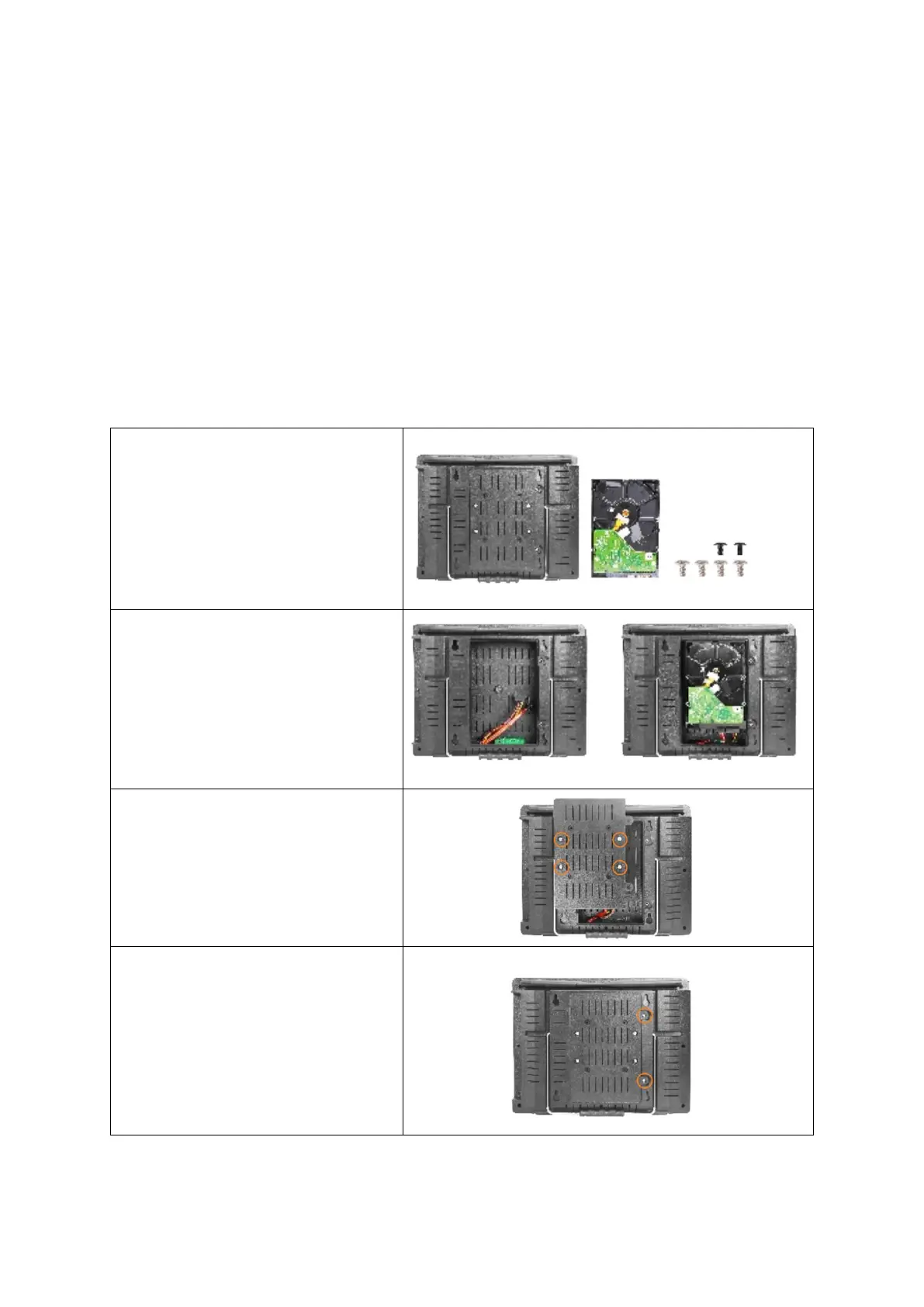
Step 1:
Loosen the screws on the back of
the NVR and then remove the
cover.
Step 2:
Connect the power cables and
data cables to the corresponding
ports of your HDD.
Step 3:
Fasten the cover and HDD with
the four screws.
Step 4:
Fasten the cover on the back of
the NVR with the two screws.

Related product manuals