8
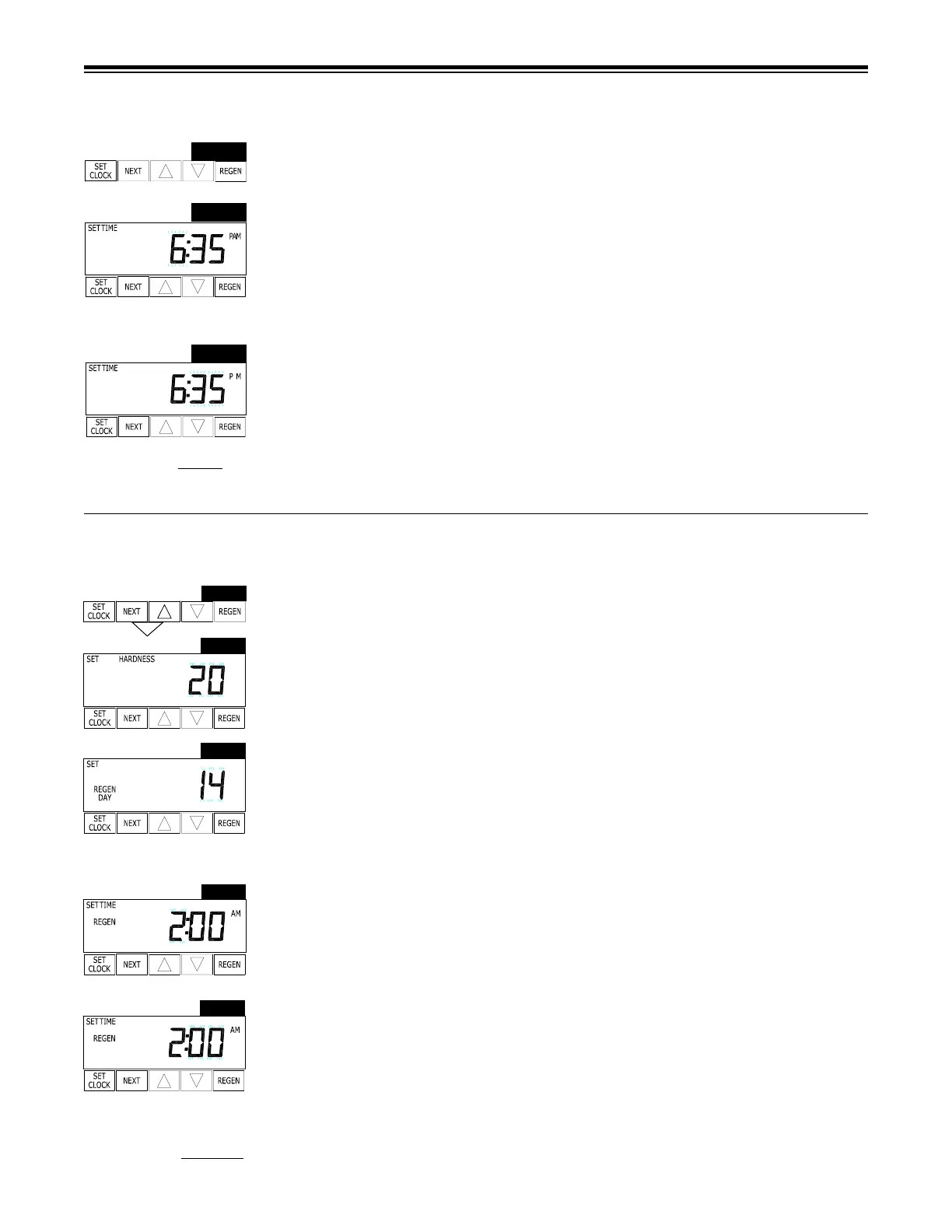
Step 1 - Press SET CLOCK.
Step 2 - Current Time (hour): Set the hour of the day using or buttons. AM/PM toggles
after 12. Press NEXT to go to step 3.
Step 3 - Current Time (minutes): Set the minutes of day using or buttons. Press NEXT to
exit Set Clock. Press REGEN to return to previous step.
Power Loss - Lithium battery on circuit board provides up to 24 hours of time- clock backup
during power outages. After 24 hours, only the time of day needs to be reset, all other values are
stored in non-volatile memory. If a power loss last less than 24 hours and time of day is ashing,
replace coin type 2032 battery. Do not forget to reset for daylight savings time.
SET TIME OF DAY
Figure 9
STEP 1
STEP 3
STEP 2
INSTALLER DISPLAYS/SETTINGS
Step 1 - Press NEXT and simultaneously for 3 seconds.
Step 2 - Hardness: Set the amount of total compensated hardness in grains (hardness as
calcium carbonate) per gallon using or buttons. The default is 20 with value ranges from 1 to
150 in 1 grain increments. Note: The grains per gallon should be increased if soluble iron needs
to be reduced. Add 3 grains of hardness for each ppm of iron present.
Step 3 - Day Override: This sets the number of days between regenerations. If value set to
“oFF” regeneration initiation is based solely on gallons used. If value is set as a number (allow-
able range from 1 to 28) a regeneration initiation will be called for on that day even if sufcient
number of gallons were not used to call for a regeneration. Set Day Override using or buttons:
• number of days between regeneration (1 to 28); or
• “oFF”
Press NEXT to go to step 4. Press REGEN to return to previous step.
Step 4 - Next Regeneration Time (hour): Set the hour of day for regeneration using or
buttons. AM/PM toggles after 12. The default time is 2:00 a.m. This display will show “REGEN”
on 0 GAL if system is set for immediate regeneration. Press NEXT to go to step 5. Press
REGEN to return to previous step.
Note: When installing this unit as part of a multi unit parallel system the
regen time of day must
be adjusted to prevent multiple units from regenerating
at the same time.
Step 5 - Next Regeneration Time (minutes): Set the minutes of day for regeneration using
or buttons. This display will not be shown if system is set for immediate regeneration. Press
NEXT to exit Installer Displays/Settings. Press REGEN to return to previous step.
Figure 10a
➔
STEP 1
STEP 2
STEP 5
STEP 4
STEP 3
➔
➔
➔
RETURN TO
NORMAL MODE
➔
➔
➔



 To Next Page