9
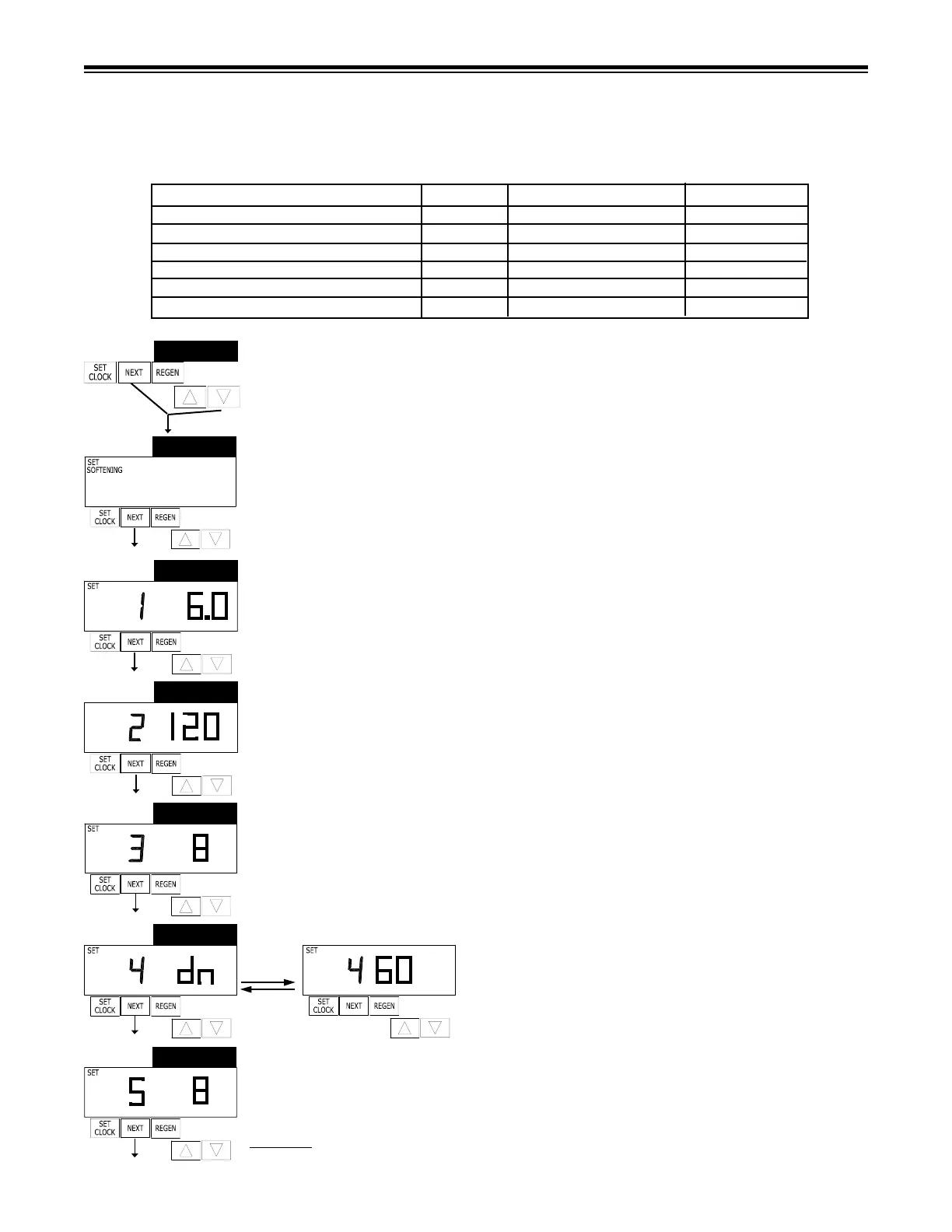
STEP 1S – Press NEXT and simultaneously for 3 seconds until display changes. If screen
in Step 2S does not appear in 5 seconds the lock on the valve is activated.
STEP 2S – Choose SOFTENING using or button. Press NEXT to go to Step 3S. Press
REGEN to exit Softener System Setup.
STEP 3S – Select the time for the rst cycle (which in this example is FILL) using the or
button. Press NEXT to go to Step 4S. Press REGEN to return to previous step.
STEP 4S – Select the time for the second cycle (which in this example is SOFTENING) using
or button. Press NEXT to go to Step 5S. Press REGEN to return to the previous step.
STEP 5S – Select the time for the third cycle (which in this example is BACKWASH) using the
or button. Press NEXT to go to Step 6S. Press REGEN to return to the previous step.
STEP 6S – Select the time for the fourth cycle (which
in this example is dn BRINE) using the or button.
Press NEXT to go to Step 7S. Press REGEN to return
to the previous step.
STEP 7S – Select the time for the fourth cycle (which in this example is 2nd Backwash) using
the or button. Press NEXT to go to Step 8S. Press REGEN to return to the previous
step.
CYCLE TIME ADJUSTMENTS
Normally it is not recommended to adjust the lengths of the cycle times. However, certain water conditions may
dictate adjustments. This should only be done from the recommendation of a water conditioning professional.
The following charts shows the upper and lower limits of each cycle.
STEP 1S
STEP 2S
Figure 12a
Cycle Options Units Lower/Upper Limit Factory Setting
Fill Lbs. 0.1 to 5200 See Page 28
Softening (Service) Minutes 1 to 480 120
Backwash Minutes 1 to 120 8
Brine Minutes 1 to 180 60
Backwash Minutes 1 to 120 8
Rinse Minutes 1 to 120 4
STEP 5S
BACKWASH
MIN
STEP 4S
MIN
SET
SOFTENING
STEP 7S
BACKWASH
STEP 3S
FILL
LBS
STEP 6S
MIN
BRINE
MIN
BRINE



 To Next Page