10
English
|
Nederlands
|
Français
|
Deutsch
6. FUNCTIONS HIGHLIGHTS
6.1 Reversible mode
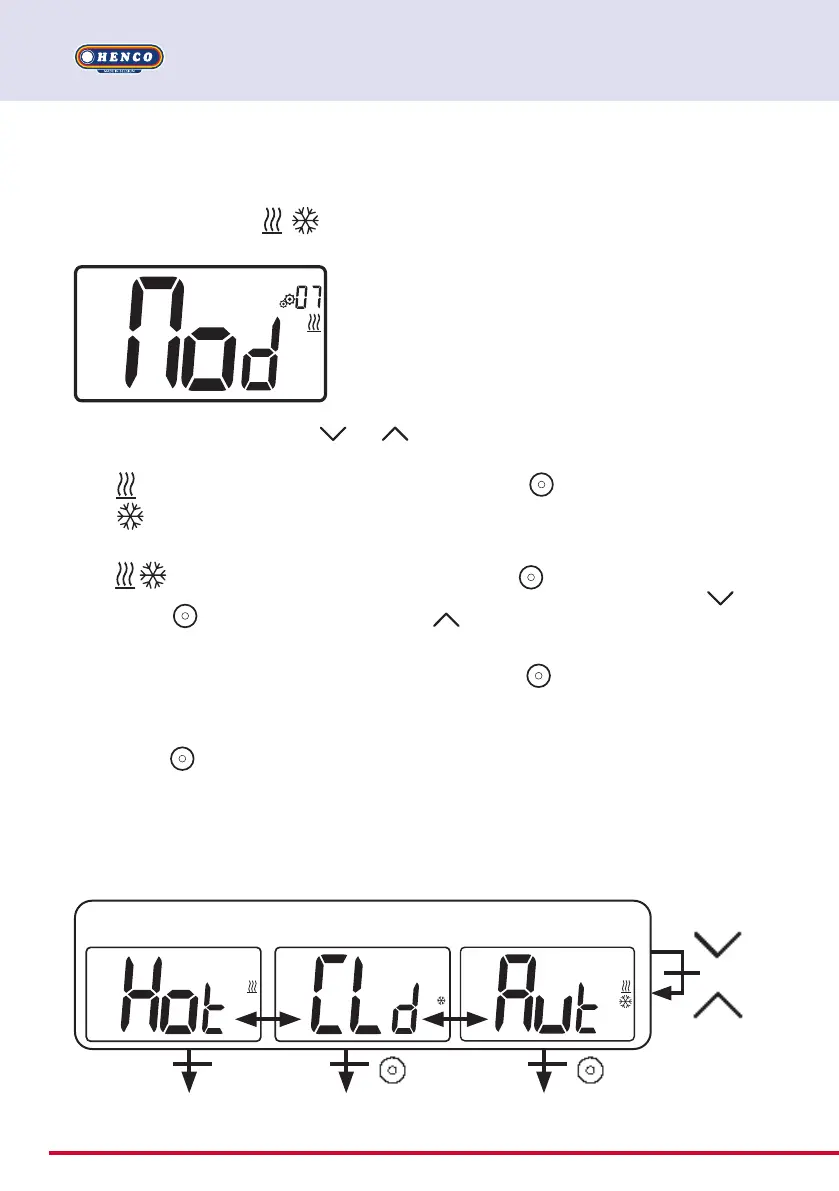
Reversible menu access
Enter user parameter 07, use keys and
, to select operating mode of the thermostat:
- Hot
: Heating regulation mode
- CLd
: Cooling regulation mode
- rEv: activation of reversible mode in menu
- Aut
: automatic Heat/Cool mode.
Pressing key
confirms the selection and
switches to comfort mode.
A user inactivity of some seconds confirms
cur- rent selection and returns to old selected
mode.
By pressing
key, temperature set point
value is validated.
Once the reversible mode has been selected,
the change of mode is made as follows:
Press 2s on
to access the menu mode
selection menu. Then go down below the
OFF mode until the 4 blank icons are dis-
played:
Select with
then select the «Hot» heating
mode or «Cld cooling mode using
and
keys.
Pressing the
key for 1s confirms the mode
selection.
User inactivity of a few seconds keeps the
thermostat in the previous mode.
Back to previous mode Navigation menu Comfort or Eco mode
automatic
return
Reversible menu
Heating mode Cooling mode Auto H&C mode
1 second Short push
or


 To Next Page