Need help?
Do you have a question about the Henco LOGIC and is the answer not in the manual?
Safety warnings and operating instructions for the thermostat.
Information regarding the intended use and application of the thermostat.
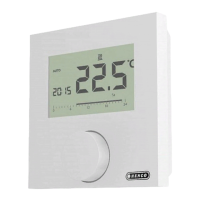
Overview of the HENCO Logic wired digital room thermostat's main features and capabilities.
List of all items included in the HENCO Logic thermostat packaging.
Step-by-step guide for the initial installation and setup of the thermostat.
Explanation of the various icons and symbols displayed on the thermostat's LCD screen.
Instructions on how to select and navigate through different operating modes of the thermostat.
Details on using the Boost/Timer mode for temporary temperature adjustments.
Information about the Comfort mode for maintaining a constant comfortable temperature.
Explanation of the Reduced/ECO mode for energy saving.
How to use the Anti-freeze mode to protect the installation from freezing.
Instructions for switching off the thermostat and the installation.
Details on the Reversible mode for switching between heating and cooling systems.
Detailed explanation of the Reversible mode and how to access its menu.
How the thermostat detects opened windows and its effect on heating.
Instructions on how to lock the thermostat's keyboard to prevent accidental changes.
How to activate and use the PIN code for thermostat security and settings protection.
Explanation of the symbols indicating heating and cooling demand.
Description of the LED colors and their meaning during operation.
Steps to enter the user parameter menu and adjust settings.
Configuration of the offset for the ECO/Reduced temperature setting.
Explanation of the 'basic navigation' mode for simplified user interface.
Setting for whether to display measured or setpoint room temperature.
Procedure for calibrating the internal room temperature sensor.
Procedure for calibrating the external room temperature sensor.
Setting up the open window detection function.
Selecting the operating mode: heating, cooling, automatic, or reversible.
Enabling or disabling cooling mode for specific rooms.
Activating, setting, and securing the thermostat with a PIN code.
Choosing the display unit for temperature (°C or °F).
How to reset user settings and parameters to factory defaults.
Displaying the current software version of the thermostat.
Accessing the professional (installer) menu for advanced configuration options.
Configuring the thermostat for wired PiLote system, defining slave or master roles.
Choosing the appropriate sensor (internal, external, floor) for temperature regulation.
Displaying the room temperature measured by internal or external sensors.
Setting minimum and maximum allowed floor temperatures for safety.
Selecting the regulation type: hysteresis or proportional band.
Adjusting the hysteresis value for temperature control precision.
Configuring cycle time and proportional band width for regulation.
Setting death band width and time threshold for H&C signals.
Defining the minimum and maximum allowed temperature set point ranges.
Setting minimum ON/OFF times to prevent short cycling of equipment.
Activating or deactivating the pump and valve exercise function for maintenance.
Enabling the anti-condensation function for installations with RH sensors.
Resetting all parameters to factory defaults by clearing the EEPROM.
Procedure to exit the installer menu and return to the main screen.
Description of the internal and external temperature sensors used by the thermostat.
Explanation of different regulation configurations based on sensor types (AIR, Amb, FLR, FLL).
Guide to diagnosing and resolving common errors like sensor failures or signal issues.
Instructions on how to clean and maintain the thermostat to ensure optimal performance.
Detailed technical specifications, including IP rating, operating conditions, and power requirements.
Compliance information regarding relevant directives and standards for the thermostat.
Physical dimensions and weight specifications of the thermostat.
 General
| Mounting | Wall Mounted |
|---|---|
| Accuracy | ±0.5°C |
| Type | Programmable Thermostat |
| Display | LCD |
| Control Type | Electronic |

 To Next Page