7
Deutsch
|
Français
|
Nederlands
|
English
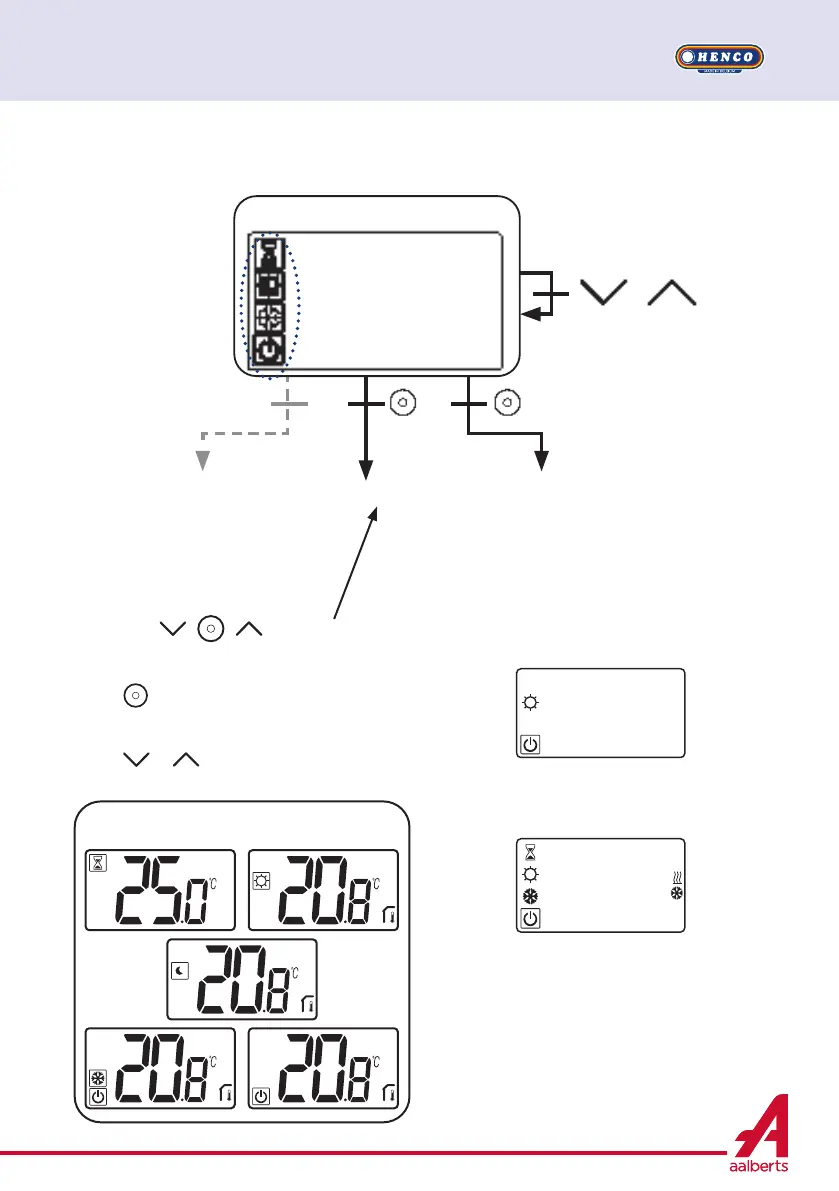
5. MODE SELECTION
Press any key to wake-up the
thermostat and activates the back- light.
Hold
key for 2 second to access to menu
for selection of mode.
Press or permits to change navigate in
different mode.
If “basic navigation” is activated, navigation
menu will be:
If “reversible mode” is activated (see paragraph
5.6 “Reversible mode” for more details), naviga-
tion menu will be:
Menu for mode selection
Boost, comfort, reduced, antifreeze,
or stand-by menus
or
Automatic selection of
current mode,
(no applicable for
Boost/timer mode and
reversible mode)
Selection of mode
Parameter menu
No user action
after 5 s
2 seconds
5 seconds


 To Next Page