6
English
|
Nederlands
|
Français
|
Deutsch
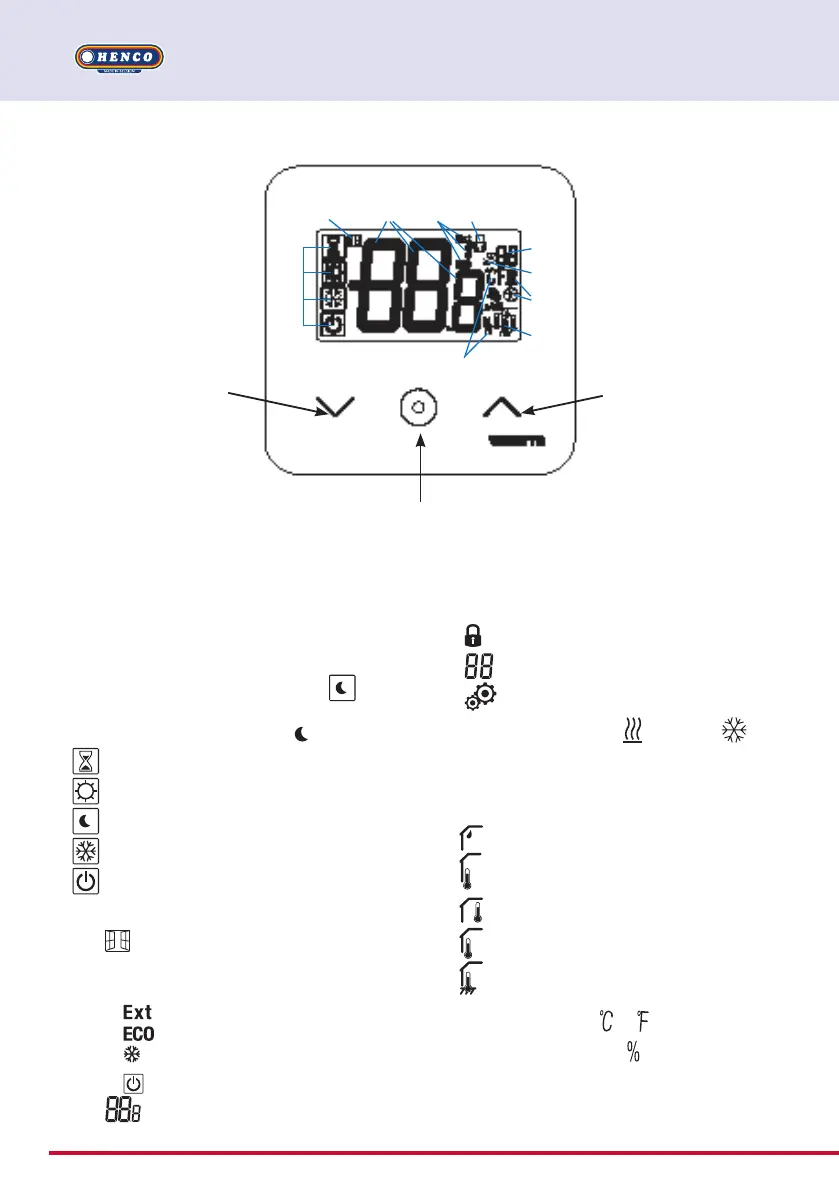
4.1 LCD logo description
1 Icon showing current operating mode of
thermostat with left to right:
Thermostat is in master configuration
when logo mode is with frame
.
Thermostat is in slave configuration when
logo is without the frame .
Boost/timer mode
Comfort mode in heating mode
Reduced / ECO mode
Frost protection mode
Off mode when “reversible” mode is
activated
2
Open window funct ion
3 Displaying of reduced clock and heating
& cooling order:
order is applied to heating system
order of reduced set point mode
order of cooling configuration
order of stop
4
Measured temperature/temperature
1
2 3 5
6
7
8
9
10
4
4. PRODUCT
DESCRIPTION
set point/remaining time for boost mode
5 Locked keyboard:
6
Parameter menu number:
7
Parameter menu:
8 Indication of heating
& cooling
demand
9 Type of measured data & sensor used for
system regulation:
Humidity measurement & control
External temperture sensor
Internal temperature sensor
Ambient temperature sensor
Floor temperature sensor
10 Temperature units
or or measure-
ment of humidity rate
Minus button or
down/left button for
menu navigation.
Plus button or up/
right button for
menu navigation.
Validation of temperature set point setting or accessing to
parameter menu or displaying measured
temperature/ temperature set point.


 To Next Page