12
English
|
Nederlands
|
Français
|
Deutsch
7. USER PARAMETERS
7.1 Access to user parameter menu
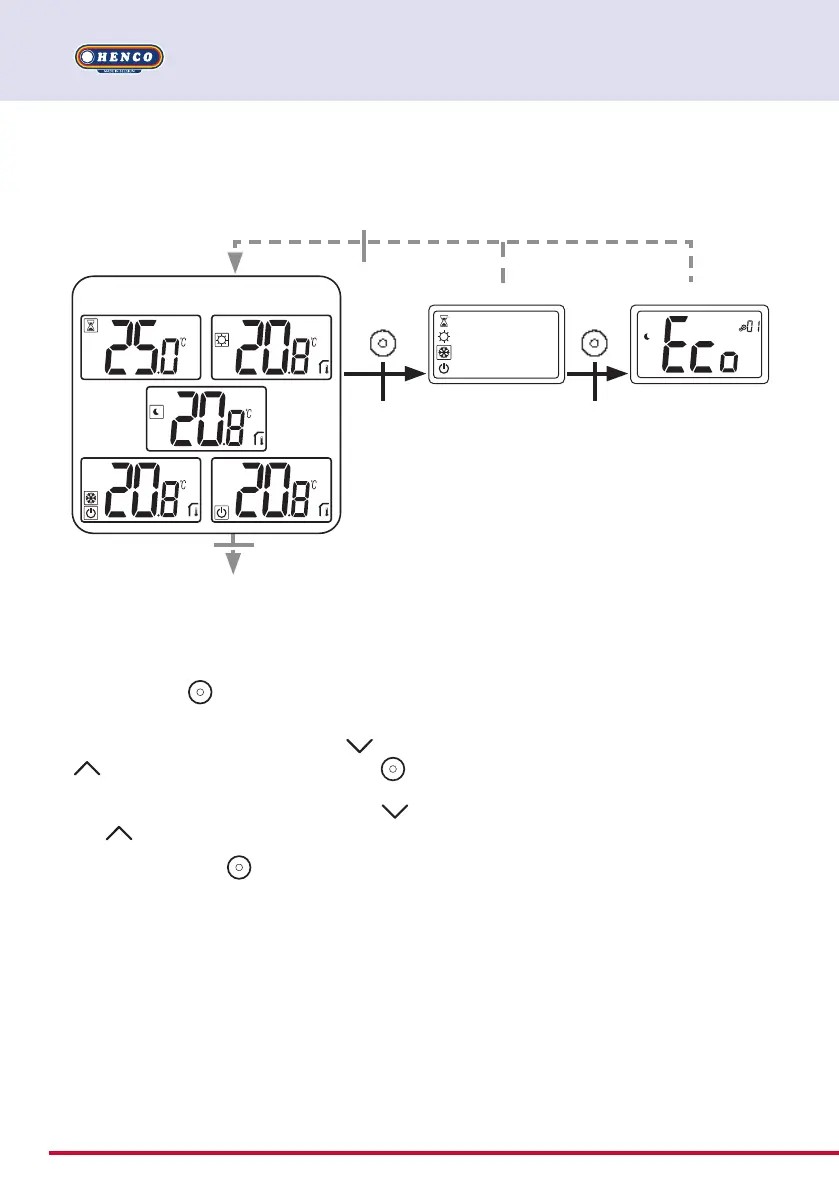
Automatic return (10 seconds of keyboard inactivity)
Mode selection menu
Screensaver
2 seconds 5 seconds
10 seconds without
user action
Parameter menu
Press any key to wake-up the thermostat and
activates the backlight.
By pressing key
during 5 seconds, user can
access to parameter menu.
The menu scroll is done with keys
and
. Menu is selected by pressing key ,
value starts blinking. Once in the menu, the
parameter value is changed with the keys
and .
Pressing again key
sets the parameter
value.
Note: Thermostat parameters are divid- ed
into two groups: user and installer (advanced
menu).
Boost, comfort, reduced, antifreeze,
or stand-by menus


 To Next Page