21
Deutsch
|
Français
|
Nederlands
|
English
10. TROUBLESHOOTING & SOLUTION
Remote errors are:
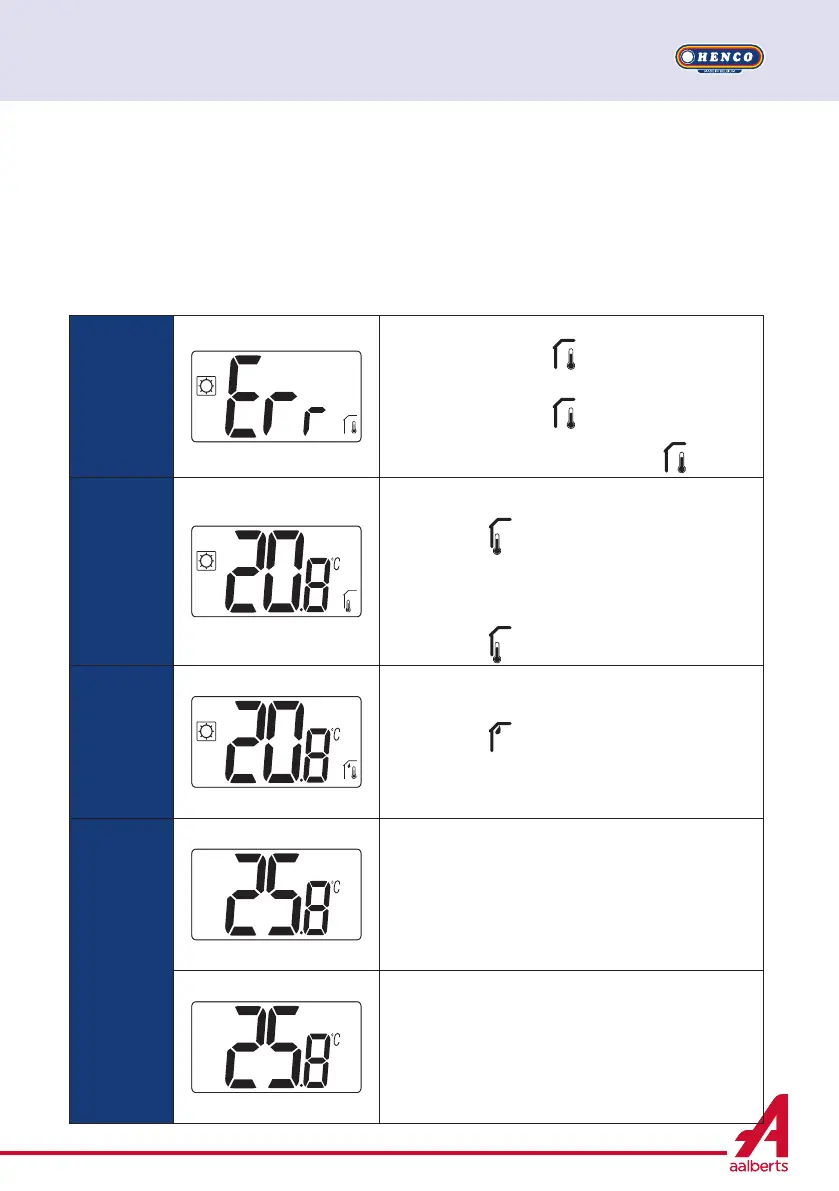
Error of temperature measurement;
o Internal sensor;
o External sensor. If this sensor is broken, remote carries on to work with internal sensor.
Error of humidity measurement;
H/C signal problem.
Internal
sensor error
User wake up thermostat:
- Displaying of “Err” and
- Red LED blinking
Thermostat’s standby if no external sensor:
- Displaying of “Err” and
- Red LED blinking
Thermostat’s standby if external sensor:
- Displaying of external temperature and
External
sensor
User wake up thermostat:
- Icon blinking
- Red LED blinking and internal sensor temperature is displayed
Thermostat’s standby:
- Internal sensor temperature is displayed
- Icon blinking
Humidity
error
User wake up thermostat:
- Icon blinking
- Displaying “Err” if user wants to read humidity value
Heat&Cool
signal
LED blinking in orange during 2 seconds when stand-by screen
is displayed (see paragraph 6.5 “H&C indication with LED”). Only
in debug mode.
User wake up thermostat:
LED blinking in red if signal on H&C line isn’t correct after 90
seconds.
Thermostat’s standby:
LED blinking in red only in debug mode.


 To Next Page