15
Deutsch
|
Français
|
Nederlands
|
English
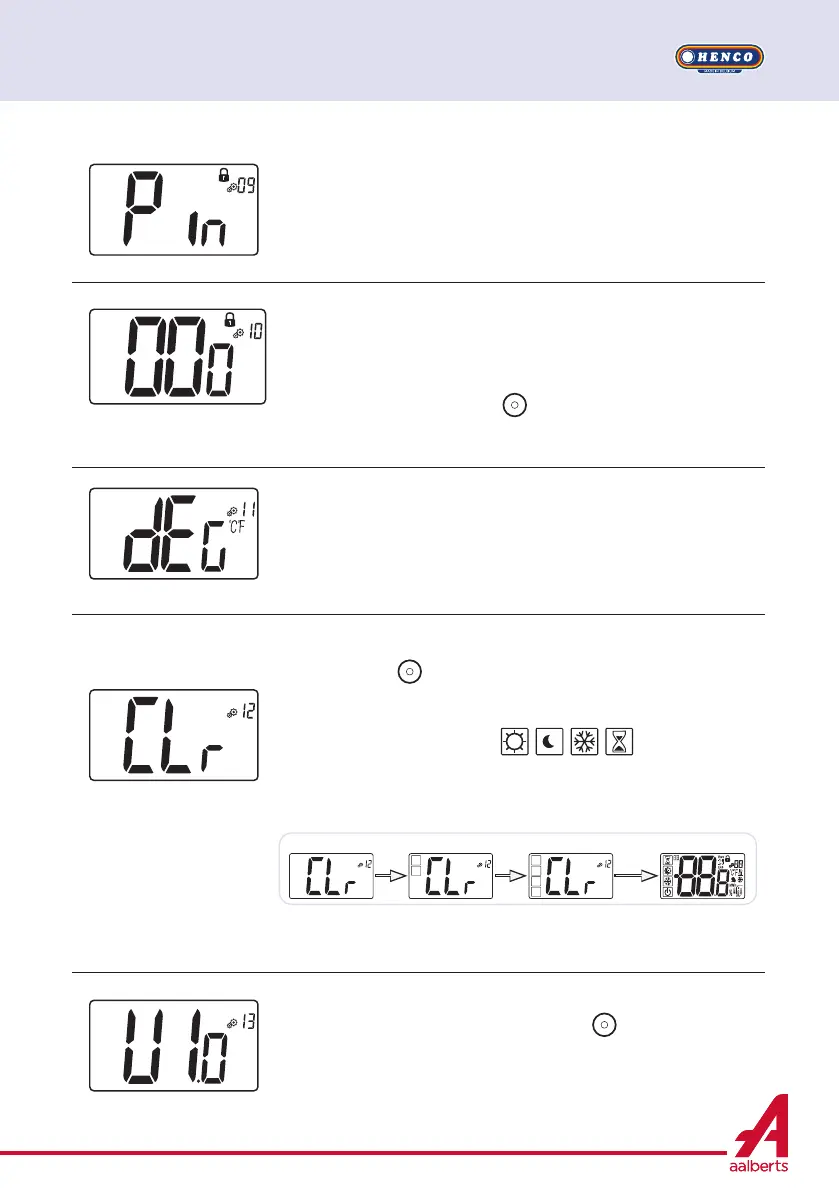
Setting value for PIN code
This menu is only displayed if parameter Pin (#09) is set with
“Yes”.
User has to configure values of the three digits with and validate
its choice with validation key
.
Default value: 000 Value range: 000 to 999
Displaying client software version
Pressing and maintaining validation key
displays software
qualification version and debug information.
Reminder: software version is written: Vxx.xx
Degree unity for displaying
°C : Celsius
°F : Fahrenheit
Default value: °C Values: °C /°F
Reset user settings:
Press and hold
for 5 seconds to reset, all segments light up,
showing that the thermostat has been reset with the factory
default setting:
Set point temperatures in
modes,
All user parameters with their factory values.
When button is hold:
Clearing user parameters
holding
button
holding
button
releasing
button
Clearing
is done
PIN code activation
“Yes”: activation of function
“no”: no activation
More information is in paragraph “PIN code & remote locking”
Default value: no Other value: Yes


 To Next Page