o
IR Control
IR Control is available for Denon AV receiver models sold after 2010.
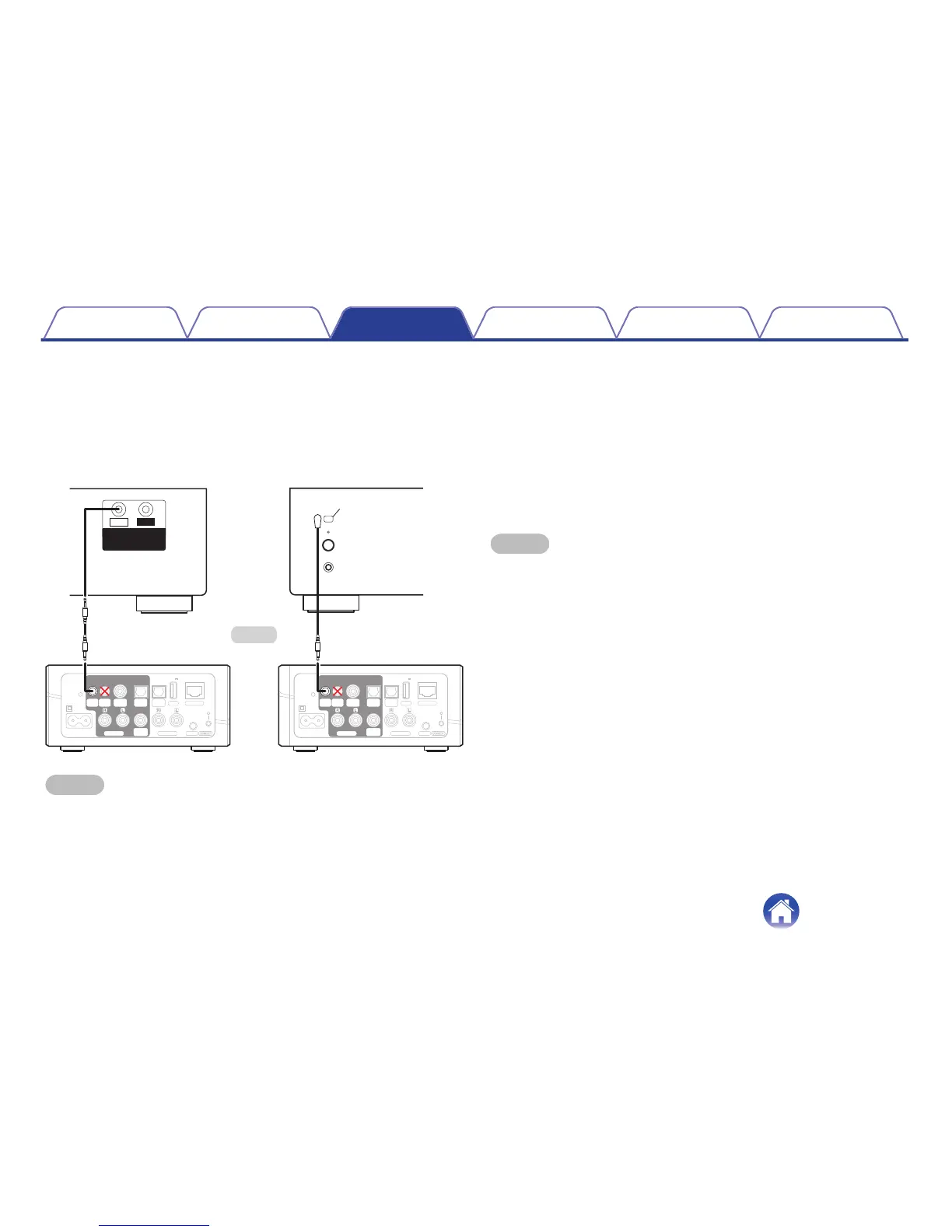
Connect the appropriate IR control cable between your AV receiver or
amplifier and the HEOS Link using the IR direct or IR emitter cable (both
included) depending on the IR control input capabilities of your device.
.
NOTE
Connecting the IR control cable (IR Direct cable/IR Emitter cable) to the Trigger Out
connector of the HEOS Link incorrectly may break the connected AV receiver, the
amplifier or the IR Emitter cable.
1
Select IR.
2
Select the type of device (AVR, PMA, or System) that
you have your HEOS Link connected to via IR.
3
Select the input on the device that you have your HEOS
Link connected to.
4
Select Done.
NOTE
You can test the connection to the AVR by pressing the power on, off, and input
buttons.
Contents Setup Use Troubleshooting Status LED Appendix
41


 To Next Page