o
Trigger Control
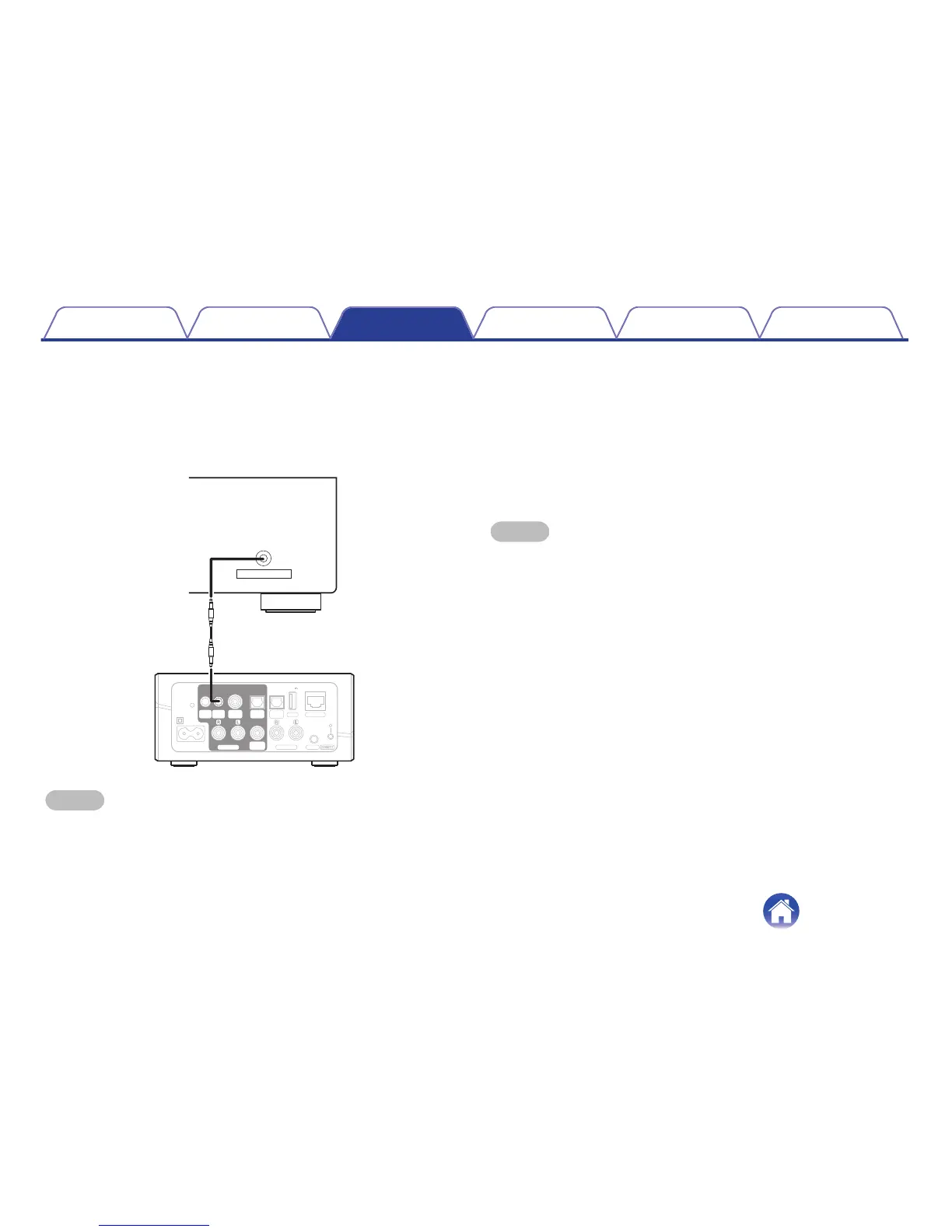
If the power amplifier connected to this unit has a trigger input connector,
connect it to the TRIGGER OUT jack of this unit using a 3.5mm cable (not
included). A signal up to 12 V/150 mA is output from the TRIGGER OUT
jack.
.
NOTE
0
Use a monaural mini-plug cable for connecting the TRIGGER OUT jacks. Do not
use a stereo mini-plug cable.
o
Trigger out
Select Trigger Control when you are connecting your HEOS to a power
amp that supports +12 V trigger input.
The HEOS App can control the power on and off for the amp.
1
Select Trigger.
2
Select Done.
NOTE
0
You can test the connection to the amp by pressing the power on, off in setting
screen for the amp.
Contents Setup Use Troubleshooting Status LED Appendix
42


 To Next Page