OPERATION
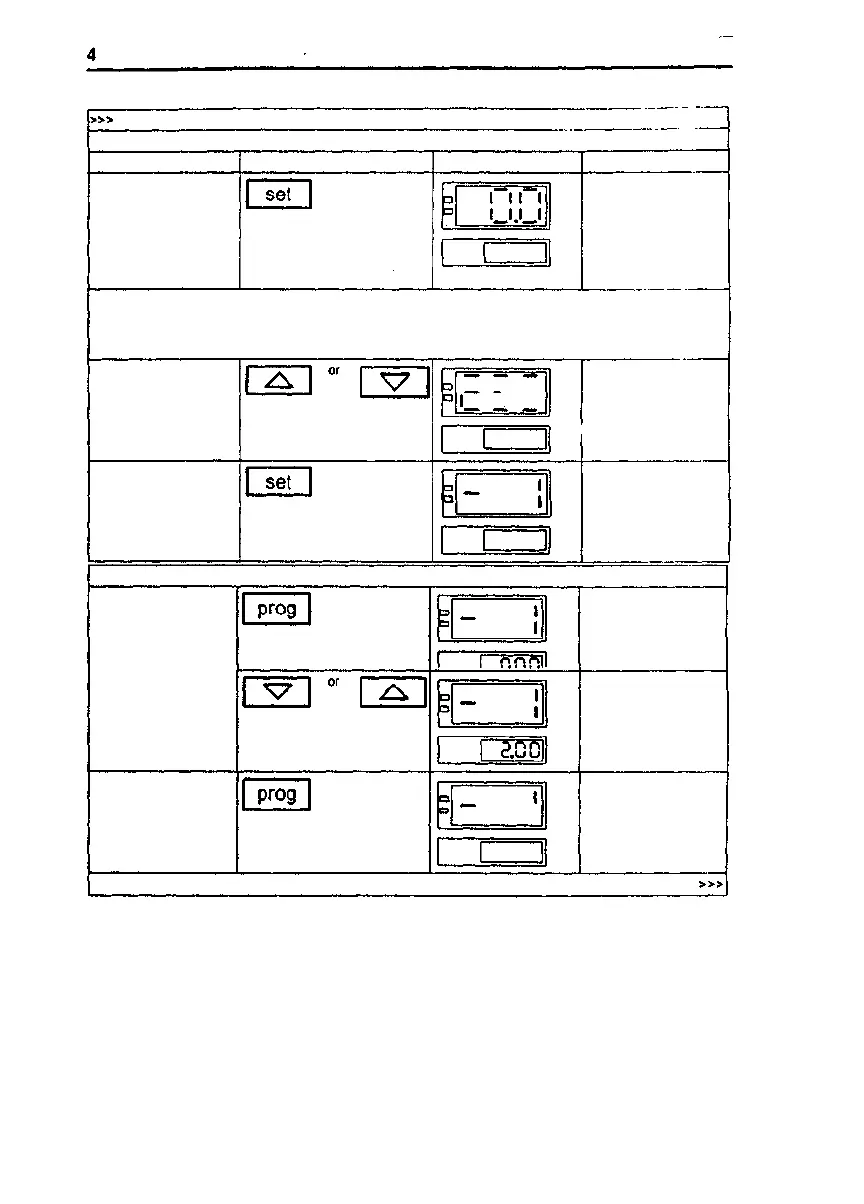
Entering the temperature for a program segment
Instruction
Key (s) Example of display
Remarks
Enter operating
temperature T 1,
230 *C
Preset operating
temperature for
program segment
1(n I) Mashes in
display
If" —" appears In the display when the set key is pressed, then "hold" or "StOP" has been enlered as
the termination command for program segment n I. If you wish to enter a temperature value, you must
first change the termination command to a time value (refer to Ihe section on "Changing the time for a
program segment").
I
II I
"II I
Enter 230 "C
Transfer temperature
T1=230 *C to the
memory
I I
Program segment
" n I" is displayed,
programmable digit
flashes
Entering the time for a program segment
Enter the time for
program segment n I,
2:00 h
I I
I I
The time for n I
flashes in the display
Timet 1= 2 . 00
Transfer the preset
time for program
segment n I to the
memory
I I I
n I is displayed,
programmable digit
flashes
Issue: May, 1994
50 042 750
23/34



 To Next Page