EasyManua.ls Logo

Heraeus Ut 6 P - Page 24

Heraeus Ut 6 P
36 pages
Print Icon
To Next Page IconTo Next Page
To Previous Page IconTo Previous Page
Loading...
OPERATION
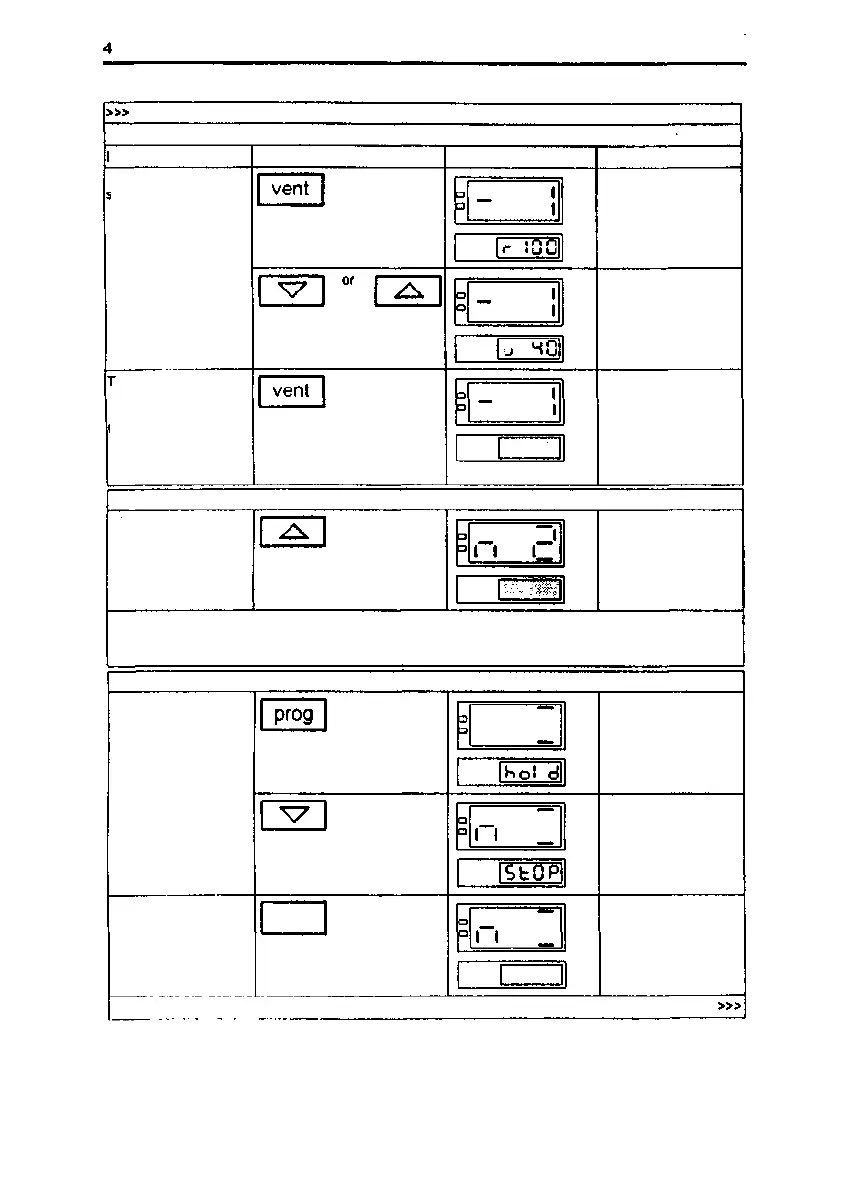
Entering the air speed level for a program segment
nstruclion
Key(s)
Example of display
Remarks
Select Ihe preset air
speed level lor
program segment n I
I I
Air speed level flashes
in the display, speed
symbol
I I
Select air speed level,
approx. 40 % in this
case
ransferthe preset air
speed level lor
program segment n I
to the memory
I I
n I is displayed,
programmable digit
flashes
Selecting the next program segment
Select program
segment n 2
n 2 Is displayed,
programmable digit
flashes
Enter the preset operating temperatures, time values and air speed levels for program
segments n 2 - n 9 in the same manner as for program segment n 1 and select program
segment n 10.
Selecting the termination command
Select the "StOP"
termination command
_ II I
I I II I
Termination command
flashes in the display
II I
II I
Enter the "StOP"
termination command
Transfer the
termination command
to the memory
prog
II I
n I
n 10 is displayed,
programmable digit
flashes
24/34
50 042 750
Issue: May, 1994

Related product manuals