12
7. Wait approximately 3 seconds until the second
buzzing sound has finished.
8. Twist the key one quarter turn further to the
program position. (This is only possible with the
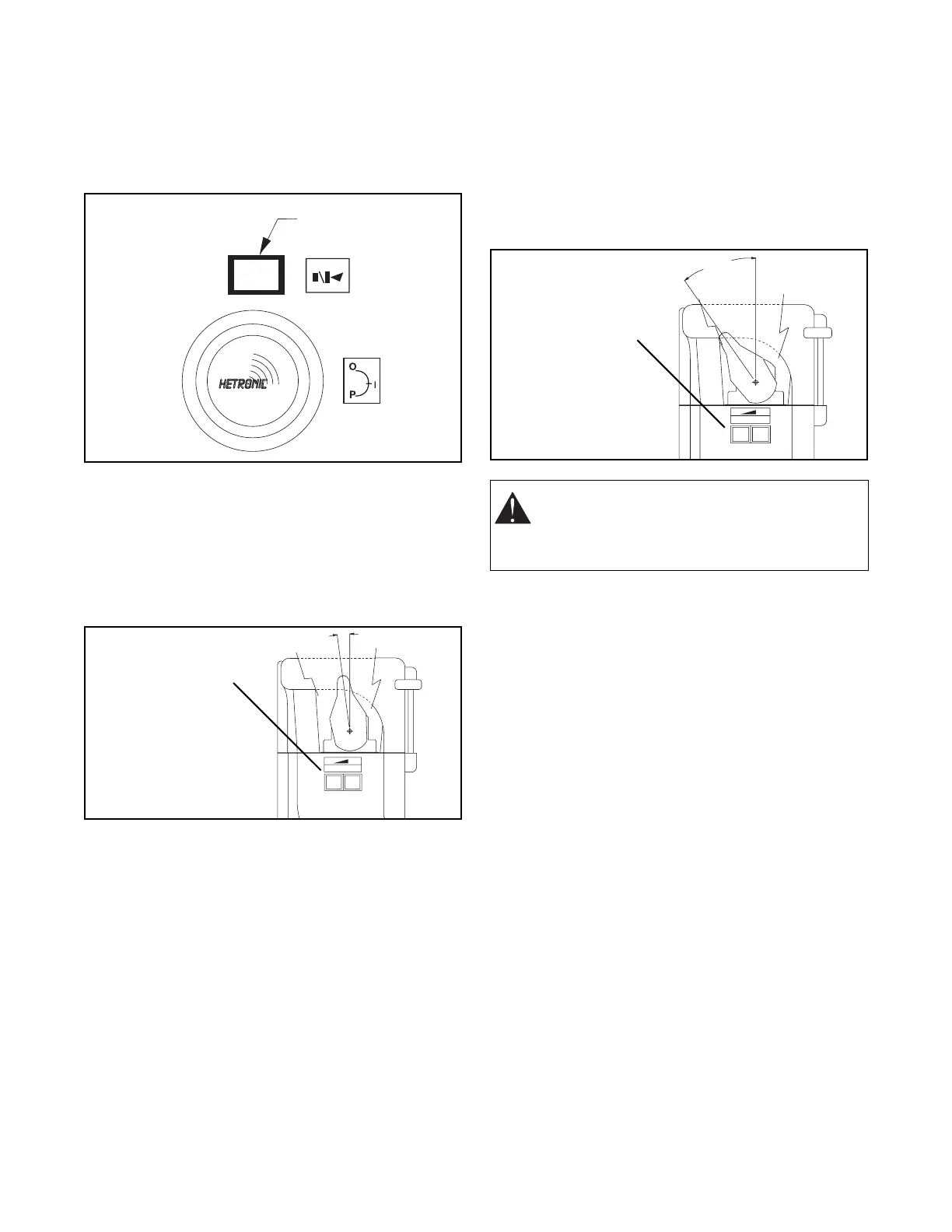
red programming key.) Press the "Start/horn"
button for at least one second.
9. To set minimum speed - Deflect the requested
joystick/paddle slowly until you hear the vehicle’s
horn. If the horn is connected to the receiver, it
will sound for a brief moment when the
joystick/paddle reaches the minimum movement
position. Keep the joystick/paddle in this position.
10. For Program Toggle Switch - Adjust the speed of
this function by using the program "T-O-T" toggle
switch (momentary - zero - momentary). Push the
toggle switch toward "+" to increase speed,
toward "-" to decrease speed.
For Program Pushbuttons (shown) - Adjust the
speed of this function by using the program
pushbuttons. Press the "+" to increase speed,
press the "-" to decrease speed.
Adjust the function speed to move as slowly as
possible. This helps to achieve a smooth start
when this function is activated.
11. For Program Toggle Switch - To set maximum
speed - Deflect the joystick/paddle to its
maximum position. Push the program toggle
switch toward "+" to increase speed, toward "-" to
decrease speed.
For Program Pushbuttons (shown) - Adjust the
speed of this function by using the program
pushbuttons. Press the "+" to increase speed,
press the "-" to decrease speed.
The receiver can program only one function at a time.
For joysticks, make sure that only one axis is deflected
at a time. When function adjustment is complete in one
direction, repeat the procedure above for the other
directions and functions. Remember to set values for
both high and low ranges.
After all adjustments are complete, wait at least 10
seconds before turning the transmitter off. The new
values will be automatically stored into the system’s
memory.
Hetronic Proprietary Software
The software that accompanies this radio remote
control system is customized per each customer’s
requirements. Refer to the Software Technical
Documentation for specific instructions on the set-up
and operation of this system.
FREQUENCY AND ADDRESS SETTINGS
Each Hetronic radio remote control system contains a
transmitter RF unit and a receiver RF unit.
The address settings are pre-set at the factory in the
ADMO module. However, if the transmitter coder
board, the base board, or if the entire transmitter or
receiver are replaced, the ADMO addresses must
match in the system.
Start/Horn Button
7.5°
P
RPM
-+
-
+
Program Pushbuttons
WARNING: AVOID INJURY - The crane is
moving during the adjustment of the
functions. Be sure the work area is clear of
obstacles and bystanders.
35.0°
P
RPM
-+
-
+
Program Pushbuttons



 To Next Page