CHUCK Bolting Data Processor
Operations Manual
CHUCK and all materials within copyright HEX TECHNOLOGY (2021) 11
In the initial configuration, CHUCK is set up for a 3-inch 150# flange, a 4-inch 1500# flange, and
a “Torque Stand.” If you want to use a different configuration, you can set that up on the
configuration screen.
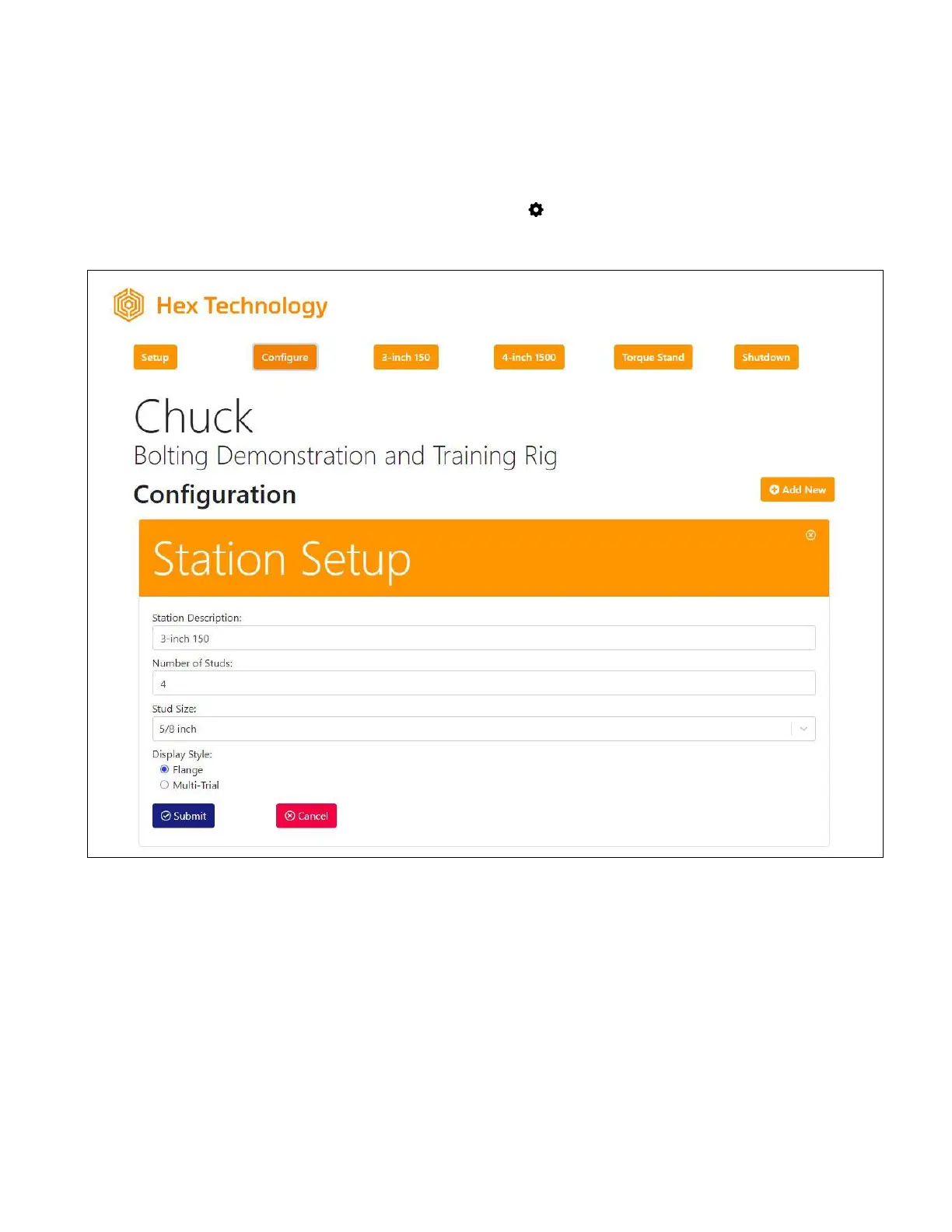
To change a station’s configuration, click the cog icon ( ) in the upper right corner. You will
arrive at a Station Setup window:
In Station Setup, you can adjust…
• Station Description, which is the text in the navigation button at the top of the page
• Number of studs: Up to 16 studs maximum
• Size of studs: Currently supports 5/8”, 3/4", or 1-1/4”.
• Data display style: Flange or Multi-Trial
o Flange means the Station’s data display page will show a flange diagram along
with columns showing the bolt load on each stud. The columns will change in
real time as bolt loads change.


 To Next Page