Home
HIFI WALKER
MP3 Player
H2 Touch Pro
Page 23 (Bluetooth Connectivity)
HIFI WALKER H2 Touch Pro - Bluetooth Connectivity
39 pages
Manual
Save Page as PDF
To Next Page
To Next Page
To Previous Page
To Previous Page
Loading...
22
7.
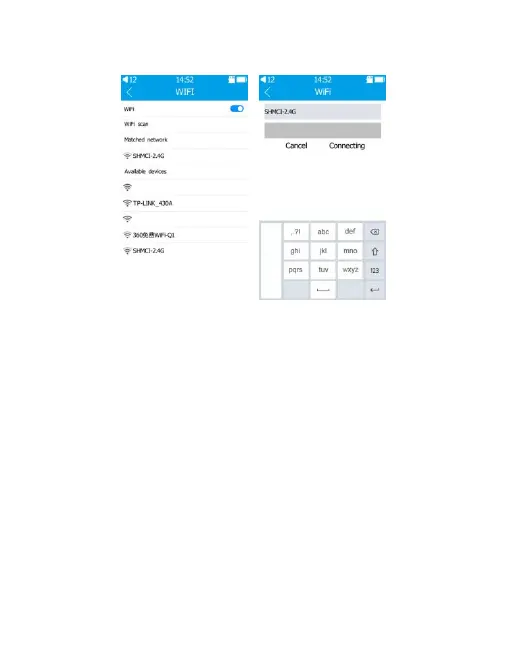
WIFI
1)
T
urn
on
Wif
i
switch,
it
will
au
tomatically
scan
available
Wifi.
2)
Choose
available
Wi
fi
and
connect
it
with
Wi
fi
password.
3)
After
connected
successfully
,
W
ifi
name
will
be
displayed
in
the
Matched
network.
4)
Wi
fi
could
be
turned
o
ff
.
22
24
Table of Contents
Main Page
Table of Contents
2
Read before Use
5
Chapter I Product Introduction
6
Product Features
6
What's in the Box
7
Product Safety Information
8
Product Illustration and Function
10
Chapter II Operation Instructions
12
Power ON/OFF
12
Lock Mode
12
Reboot the Player
12
Return
13
Volume Adjustment
13
Introduction of Touch Gestures
13
Drop-Down Menu
14
Chapter III Introduction of Functions
15
Music
15
Playing Set
16
Equalizer
18
Folder
19
Favorites
20
Search
21
Wifi
23
Bluetooth
24
E-Book
25
Chapter IV System Set
26
Screen Brightness
26
Backlight Time
27
Power off Time
27
Sleep Time
27
Lock the Screen Clock
27
Automatically Update
28
Language Setting
28
Wallpaper Settings
28
System Upgrade
29
Product Information
29
Restore Default Set
29
Format Disk
29
Chapter V Connecting Computers
30
Connect to the Computer
30
Upload and Download Files
31
Disconnect from the Computer
31
Batteries and Charging
32
Trouble Shooting
33
Technical Specifications
36
Related product manuals
HIFI WALKER H2
18 pages


 To Next Page