ENGLISH
13
TIME Mode Settings
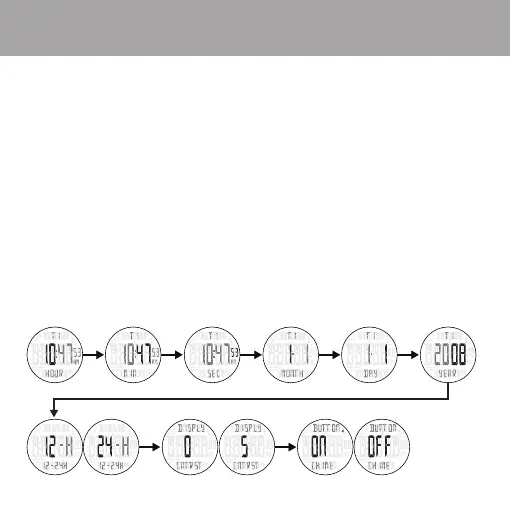
Setting TIME on your watch
1. Use START / + key to select the desired time zone.
2. Press and hold ADJUST for 3 seconds to begin setting the time.
3. Set HOUR first by using START / + and STOP / - to change the value.
4. Press MODE to move to MINUTES setting.
5. Again, use START / + and STOP / - to change the value.
6. Press MODE to move to SECONDS setting.
7. Pressing START / + or STOP / - will reset seconds to zero.
8. Following the same process, move through MONTH, DAY, YEAR and 12/24 HOUR settings.
9. The next setting is DISPLAY contrast.
10. Press START / + and STOP / - to increase or decrease the display contrast.
11. The last setting is the BUTTON CHIME ON or OFF.
If the button chime is ON, a beep will sound every time a button is pressed.
The button chime icon will also appear in TIME and ALARM mode display
when it is turned ON.
12. Press ADJUST to exit setting back to TIME mode.


 To Next Page