ENGLISH
19
ALTIMETER / BAROMETER Units
NOTE: Always use an accurate source when adjusting ALTI-BARO mode. If you set any of the units
incorrectly or extremely far away from the actual readings, all measurements in this mode will be
highly inaccurate.
NOTE: Never adjust the ALTI-BARO inside a pressurized environment like an airplane, air condi-
tioned or heated room.
WARNING: Never adjust the ALTI-BARO while you are traveling at high speeds like inside a moving
car or skiing down the mountain. Not only will the measurements be highly inaccurate, hitting a tree
can really hurt bad!
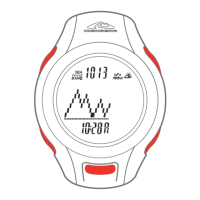
NOTE: START / + is labeled as RECALL / + on AXIO max.
NOTE: STOP / - is labeled as VIEW / - on AXIO max.
Calibrating Altitude and Barometer Readings
1. Press and hold ADJUST for 3 seconds to enter LOCAL ALTITUDE adjustment.
2. Press START / + or STOP / - to increase or decrease the value to a accurate source.
3. Press MODE to move to Sea-Level BAROMETER adjustment.
4. Press START / + or STOP / - to increase or decrease the value to a accurate source.
5. Press MODE to move to Absolute BAROMETER adjustment.
6. Press START / + or STOP / - to increase or decrease the value to a accurate source.
7. Press MODE to set 12-hour weather forecast icon to known forecast.
8. Press ADJUST to exit calibration back to ALTI-BARO mode.


 To Next Page