ENGLISH
18
ALTIMETER / TEMPERATURE / BAROMETER Units
Setting Altitude, Temperature and Barometer Units
Within ALTI-BARO mode; the altitude, temperature and barometer units
can only be modified in certain views.
NOTE: START / + is labeled as RECALL / + on AXIO max.
NOTE: STOP / - is labeled as VIEW / - on AXIO max.
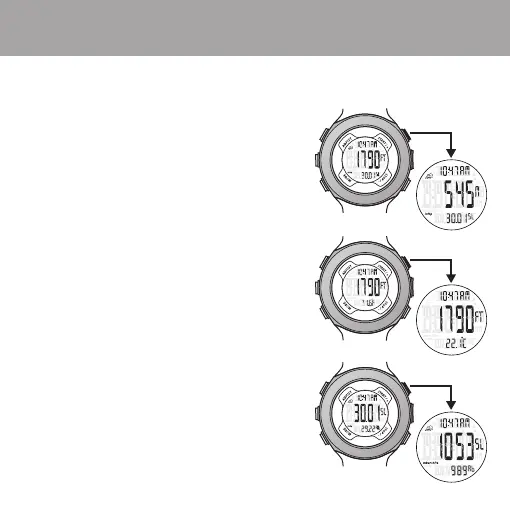
TIME / LOCAL ALTITUDE / Sea-Level BAROMETER
1. Only the LOCAL ALTITUDE units can be set in this view.
2. Default units are US Imperial FEET.
3. Press START / + to view LOCAL ALTITUDE in METERS.
4. Press and hold START / + for 3 seconds
to switch to METERS.
TIME / LOCAL ALTITUDE / TEMPERATURE
1. Only the TEMPERATURE units can be set in this view.
2. Default units are FAHRENHEIT degrees.
3. Press START / + to view TEMPERATURE
in CELSIUS degrees.
4. Press and hold START / + for 3 seconds to switch
to CELSIUS degrees.
TIME / Sea-Level BAROMETER / Absolute BAROMETER
1. Only the BAROMETER units can be set in this view.
2. Default units are Mercury Inches (InHg).
3. Press START / + to view BAROMETER
in Millibar / Hecto-Pascal (mbar / hPa).
4. Press and hold START / + for 3 seconds
to switch to mbar / hPa.


 To Next Page