Using HighPoint NVMe RAID AICs with the Dell Precision 3930 Rack Workstation
17
4.2 Uninstalling the HighPoint Software
4.2.1 Uninstall the HighPoint NVMe RAID AIC for Windows
4.2.1.1 Uninstall the driver
a. Power down the system and remove the HighPoint NVMe RAID AIC from the
system.
Notes:
Failing to remove the HighPoint NVMe RAID AIC from the system during the
uninstall process may result in data loss.
Whenever the driver is uninstalled, Windows will attempt to install the
default NVMe support, which may corrupt the RAID configurations and any
data stored on SSDs hosted by the HighPoint NVMe RAID AIC.
b. Power on the system and boot Windows.
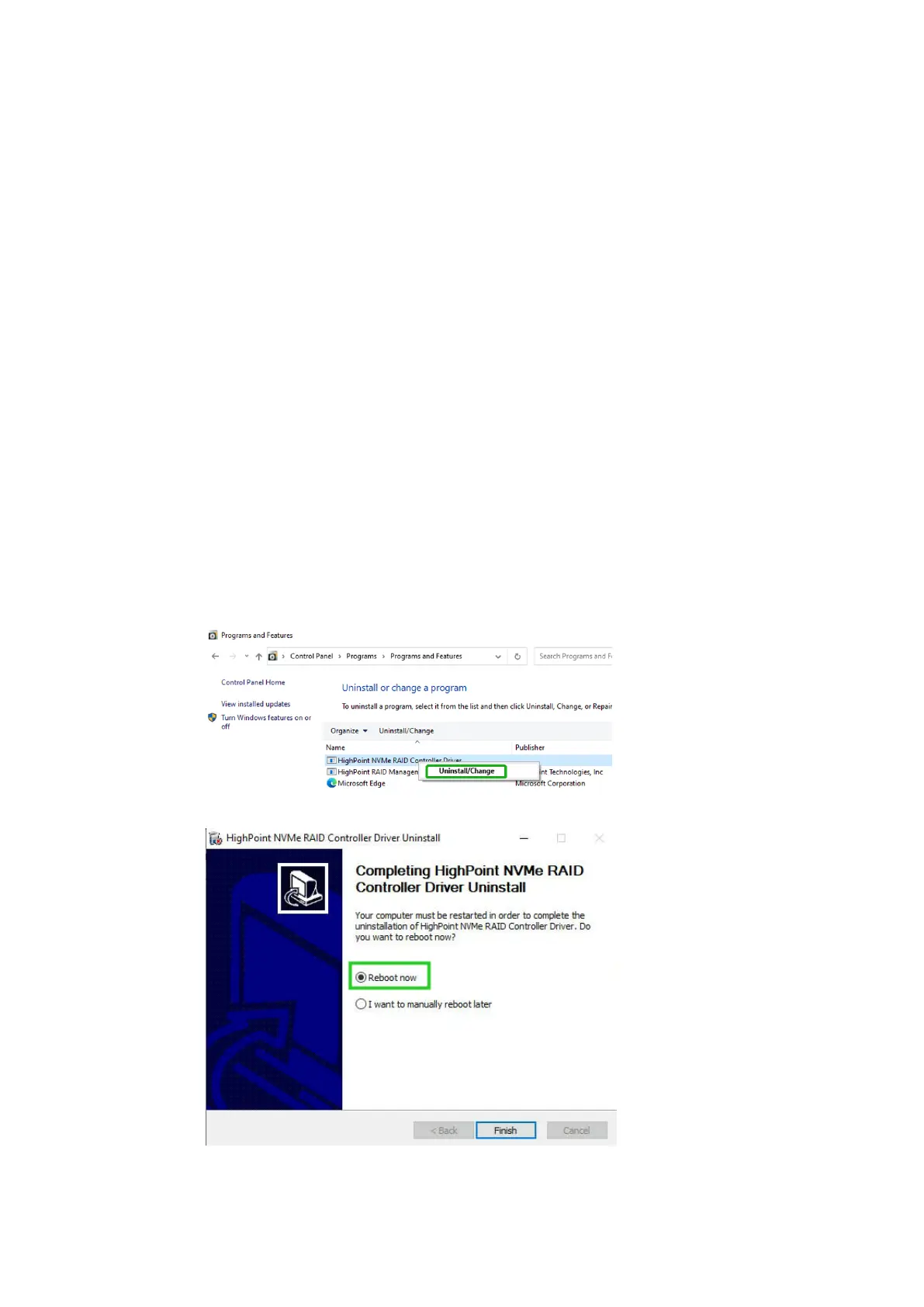
c. Access Control Panel and select Programs Programs and Features, and
click on the HighPoint NVMe RAID Controller Driver entry.
d. Click Uninstall/Change.
e. After uninstalling the driver, click Finish.
f. Reboot Windows to complete the uninstall procedure.















 To Next Page