DS-A80&81 Series Storage System User Manual
30
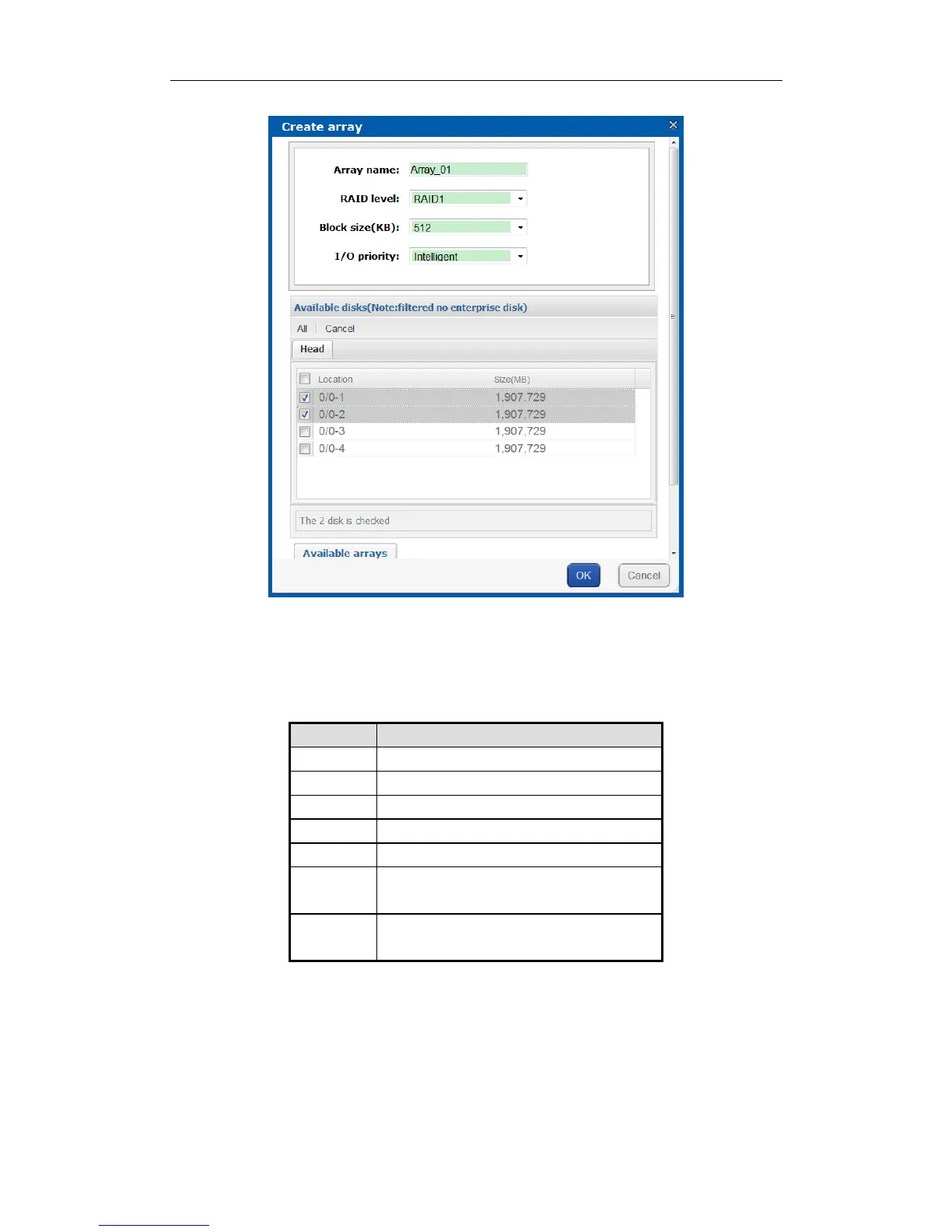
Figure 4. 8 Create Array
2. Input Array name in text field.
3. Select RAID level in dropdown list. Up to 8 kinds of RAID are provided, including RAID 0, RAID 1, RAID 3,
RAID 5, RAID 6, RAID 10, and RAID 50.
Figure 4. 9 Required Disk Quantity
RAID is made of RAID 0 and RAID 1 which requires
at least 4 even disks.
RAID is made of RAID 0 and RAID 5 which requires
at least 6 even disks.
4. Select Block size(KB) in dropdown list.
5. Select I/O priority as Performance priority, Protection priority, Balance, or Intelligent.
Performance priority: To guarantee external IO task’s performance, internal IO task is totally stopped.
Protection priority: To guarantee internal IO task’s performance, external IO task would only take the
rest channel.
Balance: When both internal and external IO task exist, Balance ensures internal IO task occupy
certain channel without influencing external IO task.


 To Next Page
 Loading...