EasyManua.ls Logo

HIKVISION DS-K1102M - Cable Definitions

HIKVISION DS-K1102M
24 pages
Print Icon
To Next Page IconTo Next Page
To Previous Page IconTo Previous Page
Loading...
DS-K1100 Series Card Reader
8
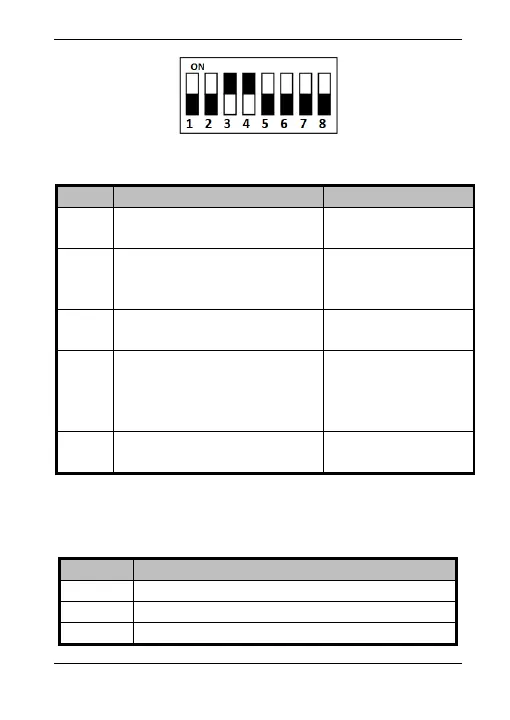
Figure 2-3 DIP Switch Module
Table 2-2 Description of DIP Switch
No.
Description
DIP Switch Status
1 ~ 4
Address of RS-485
1: 1
0: 0
5
Read card No. or file in card.
(Only available for CPU card
reader.)
1: read card No;
0: read file in card.
6
Wiegand protocol or RS-485
protocol.
1: Wiegand protocol;
0: RS-485 protocol.
7
Wiegand Protocol
(available when No. 6 is 1)
1: Wiegand protocol
of 26-bit;
0: Wiegand protocol
of 34-bit.
8
Matched Resistance
(available for RS-485 protocol)
1: Enable;
0: Disable.
2.3 Definition of Cable
The description of 10 cables is shown below.
Table 2-3 Description of Cable
Color
Description
Yellow
RS-485+
Brown
Blue LED Control (available for Wiegand Protocol)
Blue
RS-485-

Other manuals for HIKVISION DS-K1102M

Related product manuals