
 Need help?
Do you have a question about the HIKVISION DS-K1T804BEF and is the answer not in the manual?
Warnings about potential severe injury or death if precautions are neglected.
Warnings about potential equipment damage or injury if precautions are neglected.
Step-by-step guide for activating the device directly through its interface.
Instructions for activating devices using the SADP tool over a local network.
Steps to add an administrator user to the device for system management.
Managing user data, including adding, editing, and deleting persons.
 General
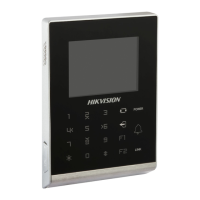
| Model | DS-K1T804BEF |
|---|---|
| Type | IP Access Controller |
| Camera | 2 MP |
| Communication | TCP/IP, RS-485 |
| Power Supply | 12 VDC/2 A |
| Dimensions | 135mm × 105mm × 25mm (5.31" × 4.13" × 0.98") |
| Operation System | Linux |
| Fingerprint recognition duration | < 1s |
| FAR (False Acceptance Rate) | ≤ 0.001% |
| Fingerprint comparing mode | 1:1, 1:N |
| Fingerprint capacity | 3000 |
| Reading frequency | 13.56 MHz |
| Card type | Mifare card |
| Working humidity | 10% to 90% (non-condensing) |
| Installation | Wall-mounted |
| Language | Multi-language support |
| Reader Interface | Wiegand |
| Operating Humidity | 10% to 90% (non-condensing) |
| Card Reader | Built-in card reader |
| Operating Temperature | -10 °C to +55 °C (14 °F to +131 °F) |
| Event capacity | 100000 |
| Working temperature | -10°C to 55°C (14°F to 131°F) |
| Communication Interface | RS-485 |
| Wiegand Signal | Wiegand 26/34 |




 To Next Page