©2013 Hill-Rom Services, Inc. ALL RIGHTS RESERVED – INTL. Version
For detailed Warning and Caution statements, and operating instructions, refer to the Progressa™ Bed User Manual
Turn Assist - Right
Assists caregiver in turning the patient for linen changes,
dressing changes, bed panning, back care, and other
nursing procedures.
• Siderails must be in the up position to activate turn assist
• Once turn assist is initiated, you may lower a siderail to
facilitate patient care
— The bed will alarm as a safety precaution
To activate:
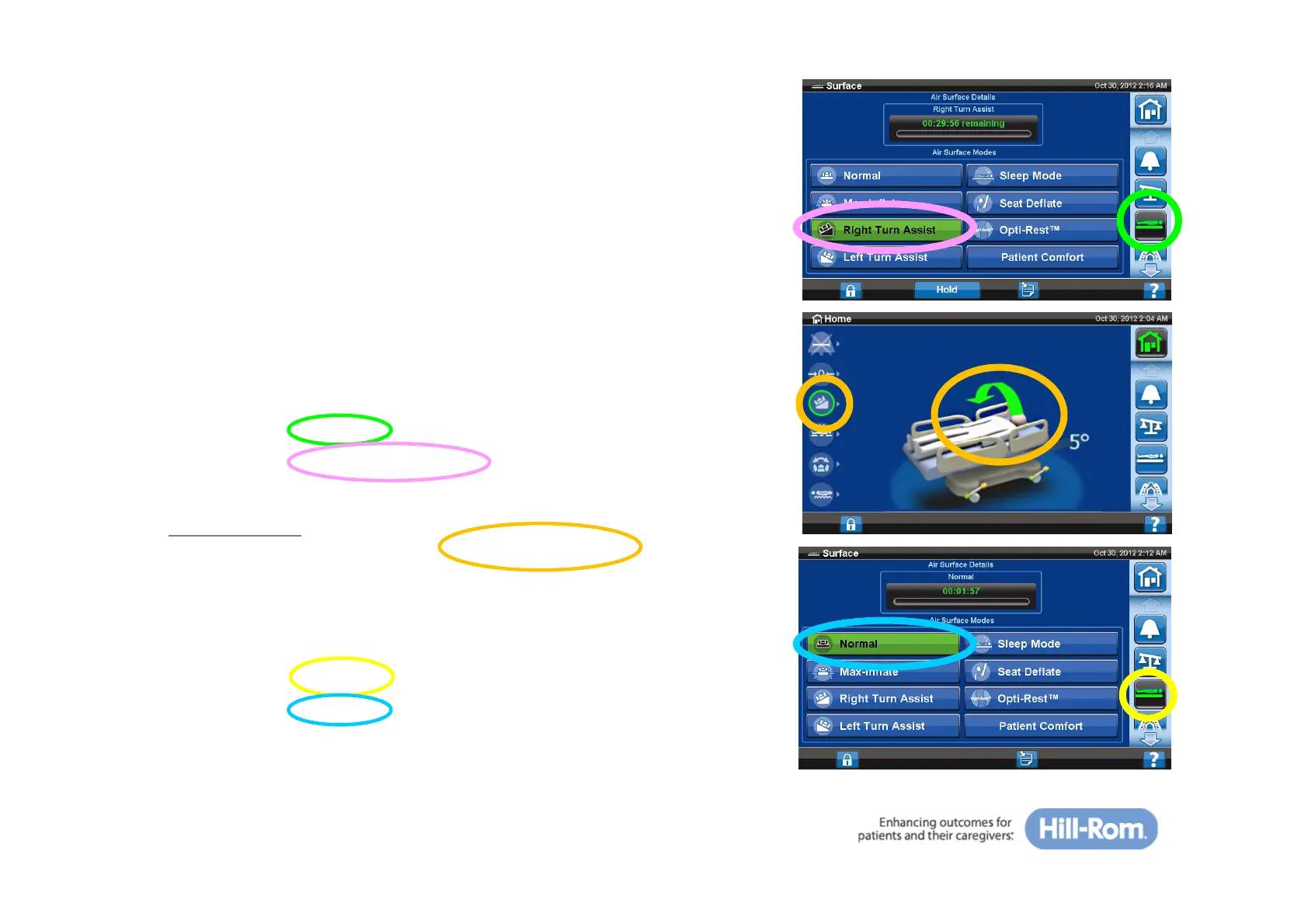
• Select the ‘Surface’ tab on home screen
• Select the ‘Right Turn Assist’ tab (patient’s right)
Confirmation
• On the home screen, the “Right Turn Assist” icon will
be highlighted when active
To deactivate:
• Select the ‘Surface’ tab on home screen
• Select the ‘Normal’ control
29







 To Next Page