©2013 Hill-Rom Services, Inc. ALL RIGHTS RESERVED – INTL. Version
For detailed Warning and Caution statements, and operating instructions, refer to the Progressa™ Bed User Manual
Patient History
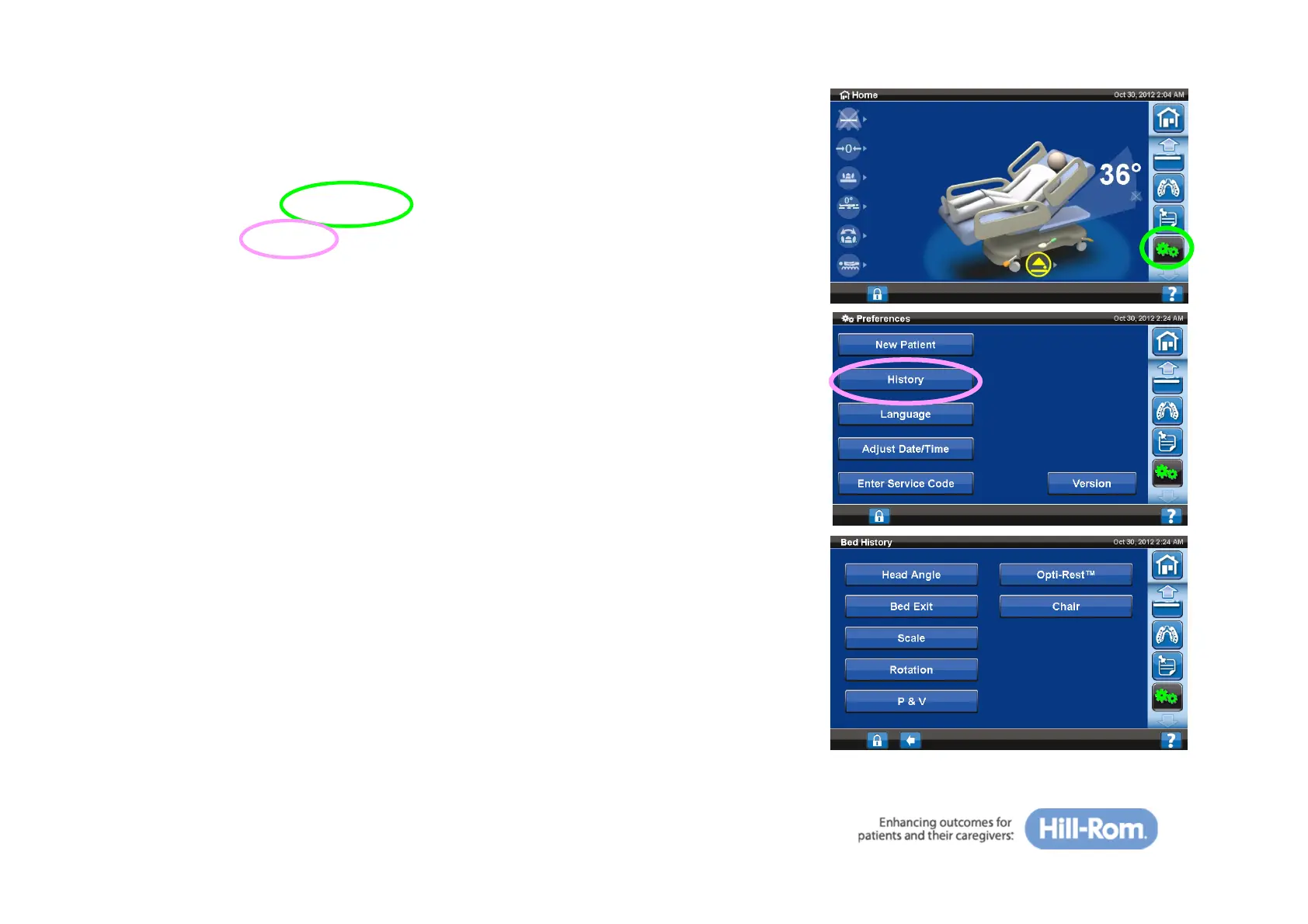
To view patient history:
• Press the ‘Preference’ tab on the GCI
• Press ‘History’
• Select the desired history to display:
– Head Angle: Time spent with the head of bed more than
30⁰ or 45⁰ since 12am
– Bed Exit: Time spent with the Bed Exit alarm ON
– Scale: Weight increase or decrease in 24-hour periods
– Rotation: The maximum number of cycle/hour the patient has
rotated and Hrs: Mins in rotation, in 24 hours
– P & V: The number of treatments provided per 24-hour period
– OPTI-REST™: Time spent in OPTI-REST mode since 12am
– Chair: Time spent in Chair position since 12am
35







 To Next Page