Page 60 194412(11) - Hill-Rom® 900 Accella™ Bed - Instructions For Use
Locating the bed manually with the GCI™
Wi-Fi status
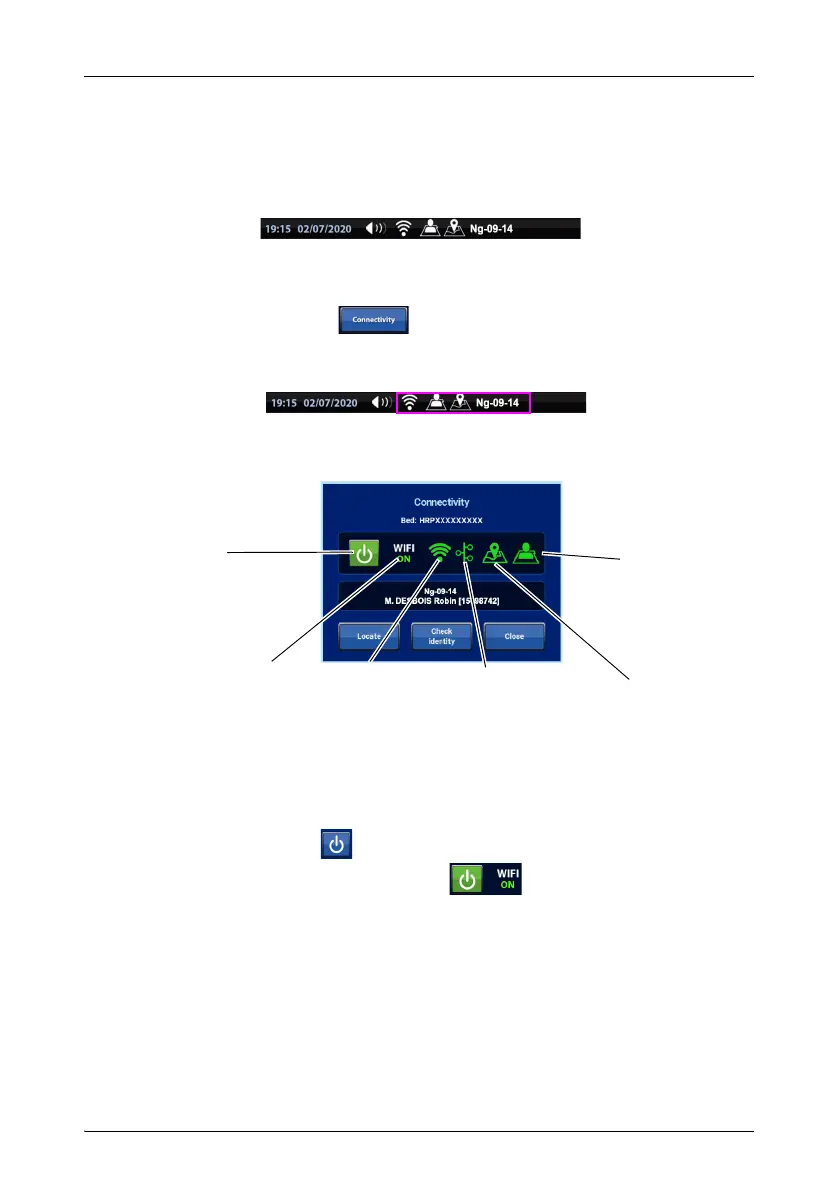
The status of the Wi-Fi connection is displayed at the bottom of the various
screens of the GCI™. For more details see “Meaning of the Wi-Fi connection
information on the GCI” page 3-56.
To go to the Wi-Fi menu:
•Press Parameters on the GCI.
• Then press Connectivity.
or
•
Press the status bar of the Wi-Fi and location information.
Status
ON/OFF
Status
Wi-Fi
Status
Server connection
Status
Bed location
ON/
OFF
button
ON/OFF
Patient ID
status
Bed-locating procedure
Check that the “manual location” mode is active (see “Setting the Wi-Fi options” page
54). Only applies to the Hillrom™ Digital Health Gateway.
1. The Wi-Fi is not active:
a. Press the button to switch on the Wi-Fi connection.
b. The Wi-Fi connection is activated.
, Wait for the connection with
the server.
2. The Wi-Fi is active and connected to the server:
a. Press Locate.











 To Next Page