EasyManua.ls Logo

Hilti SFC 14-A - User Manual

Hilti SFC 14-A
20 pages
Print Icon
To Next Page IconTo Next Page
Loading...
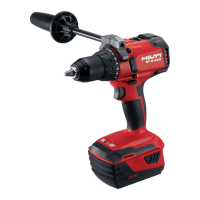
SFC 14A
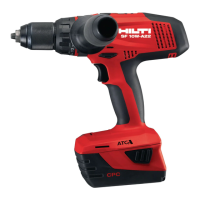
SFC 22A
English
Printed: 11.09.2018 | Doc-Nr: PUB / 5152681 / 000 / 04

Other manuals for Hilti SFC 14-A

Questions and Answers

  • M
    Mikayla CookAug 20, 2025
    What to do if Hilti SFC 14-A Drill doesn't work?
    • B
      Bryan AlexanderAug 20, 2025
      If your Hilti Drill isn't working, there are several potential causes. First, ensure the battery is fully inserted until you hear a double click. If that's not the issue, the battery might be low, so try changing it and charging the depleted one. If these steps don't resolve the problem, there may be an electrical fault. In this case, remove the battery from the tool and contact Hilti Service.
  • M
    Ms. Vanessa ValentineAug 22, 2025
    What to do if Hilti SFC 14-A battery does not engage?
    • J
      Jeffrey JohnsonAug 22, 2025
      If the Hilti Drill battery doesn't engage with a double click, the retaining lugs on the battery might be dirty. Clean the retaining lugs and then push the battery in until it engages. If the problem continues, contact Hilti Service.
  • J
    Jessica MezaAug 25, 2025
    Why does my Hilti SFC 14-A LED 1 flash?
    • G
      Gregory BushAug 25, 2025
      If LED 1 is flashing on your Hilti Drill, it could be due to a low battery. Try changing the battery and charging the empty one. Alternatively, the tool might be overloaded because the application limits have been exceeded. Ensure that you pay attention to the power and performance rating of the product before using it and check its suitability for the job.
  • D
    Diane ParkAug 26, 2025
    What to do if Hilti SFC 14-A Drill doesn't work and LED flashes?
    • D
      Donald ThomasAug 26, 2025
      If your Hilti Drill isn't working and an LED is flashing, it could be due to a low battery. Try replacing the battery and charging the depleted one. Another possibility is that the battery is either too hot or too cold. Allow the battery to reach the recommended operating temperature.
  • B
    Benjamin HillAug 28, 2025
    How to unlock the on/off button on a Hilti Drill?
    • R
      randersonAug 28, 2025
      If the on/off button on your Hilti Drill is locked, it's likely because the forward/reverse selector switch is in the middle position. Simply push the forward/reverse switch to the left or right to unlock the button.
  • J
    Jason CampbellAug 29, 2025
    Why my Hilti Power Tool does not work?
    • A
      Ashley HarringtonAug 29, 2025
      If your Hilti Power Tool isn't working, it could be due to a few reasons. First, make sure the battery is fully inserted until you hear a double click. If that's not the issue, the battery might be low, so try changing it and charging the empty one. If neither of these steps works, there may be an electrical fault. In this case, remove the battery and contact Hilti Service.
  • L
    Laura DonaldsonAug 31, 2025
    How to unlock the on/off button on Hilti Power Tool?
    • G
      Gary MolinaAug 31, 2025
      If your Hilti Power Tool's on/off button is locked, it's likely because the forward/reverse selector switch is in the middle position. To unlock it, simply push the forward/reverse switch to either the left or right.
  • M
    Michele RossSep 2, 2025
    What to do if LED 1 flashes on my Hilti Power Tool?
    • A
      Angela ThomasSep 2, 2025
      If the LED 1 flashes on your Hilti Power Tool, it could be due to a low battery. Try changing the battery and charging the empty one. Alternatively, the tool might be overloaded because you exceeded application limits. Check the 'Technical data' section to ensure the tool is suitable for the job.
  • A
    amandawelchSep 4, 2025
    What to do if Hilti Power Tool does not work and one LED flashes?
    • S
      Susan WrightSep 4, 2025
      If your Hilti Power Tool does not work and one LED flashes, the battery might be low. Try replacing the battery and charging the depleted one. Alternatively, the battery could be too hot or too cold. Allow the battery to reach the recommended operating temperature.
  • M
    Mallory KingSep 6, 2025
    What to do if the battery does not engage with an audible double click on Hilti Power Tool?
    • C
      Claire GrahamSep 6, 2025
      If the battery doesn't engage with an audible double click on your Hilti Power Tool, the retaining lugs on the battery might be dirty. Clean the retaining lugs and push the battery in until it engages. If the problem continues, contact Hilti Service.

Summary

Information about the documentation

About this documentation

Prerequisite for safe, trouble-free handling and use of the product.

Explanation of symbols used

Defines signal words (Danger, Warning, Caution) and symbols used in warnings and illustrations.

Product-dependent symbols

Lists symbols found on the product itself, such as drilling action and speed indicators.

Safety

General power tool safety warnings

Essential safety guidelines for operating power tools, covering work area and electrical safety.

Additional safety precautions for screwdrivers

Specific safety measures for screwdrivers, including personal safety and handling.

Description

Overview

Illustrates and labels the main components of the cordless drill/driver and battery.

Intended use

Defines the primary applications and compatible accessories for the cordless drill/driver.

Items supplied

Lists the standard contents included with the drill/driver purchase.

Technical data

Technical data

Provides specifications like rated voltage, weight, speed, and torque for both models.

Noise information and vibration values

Details sound pressure and vibration measurements according to EN 60745 standards.

Battery

Specifies operating voltage, ambient, and storage temperatures for the 14.4V battery.

Battery

Specifies operating voltage, ambient, and storage temperatures for the 21.6V battery.

Operation

Inserting the battery

Instructions for safely and correctly fitting the battery pack into the tool.

Removing the battery

Procedure for detaching the battery pack from the cordless drill/driver.

Fitting the accessory tool

Steps to securely insert and attach drilling or screwdriving accessories.

Removing the accessory tool

Guidance on safely detaching accessories from the keyless chuck.

Switching on

How to activate the drill/driver using the control switch and its speed adjustment.

Switching off

Procedure for safely deactivating the cordless drill/driver.

Drilling

Settings and steps for performing drilling operations with the tool.

Screwdriving

Settings and steps for performing screwdriving tasks with the tool.

Setting forward or reverse rotation

How to change the direction of rotation for drilling and screwdriving.

Selecting the gear

Instructions for choosing the appropriate gear for different tasks.

Fitting the belt hook (optional)

Steps to attach the optional belt hook for convenient carrying.

Troubleshooting

Troubleshooting

Identifies common problems with the tool and provides solutions for each issue.

Disposal

Battery disposal

Safe and proper methods for disposing of batteries, avoiding hazards and environmental impact.

China RoHS (guideline on restriction of the use of dangerous substances)

Manufacturers warranty

Hilti SFC 14-A Specifications

General IconGeneral
Number of gears2
Screw diameter (max)8 mm
Sound pressure level69 dB
Idle speed (1st gear)1700 RPM
Drilling diameter in wood (max)20 mm
Drilling diameter in steel (max)10 mm
Vibration level (metal drilling)2 m/s²
Maximum torque (hard applications)45 N⋅m
Maximum torque (soft applications)24 N⋅m
Product colorBlack, Red
Chuck typeKeyless
Product designPistol grip drill
Number of batteries included1 pc(s)
Power sourceBattery
Battery voltage14 V
Weight and Dimensions IconWeight and Dimensions
Weight1500 g

Related product manuals