3
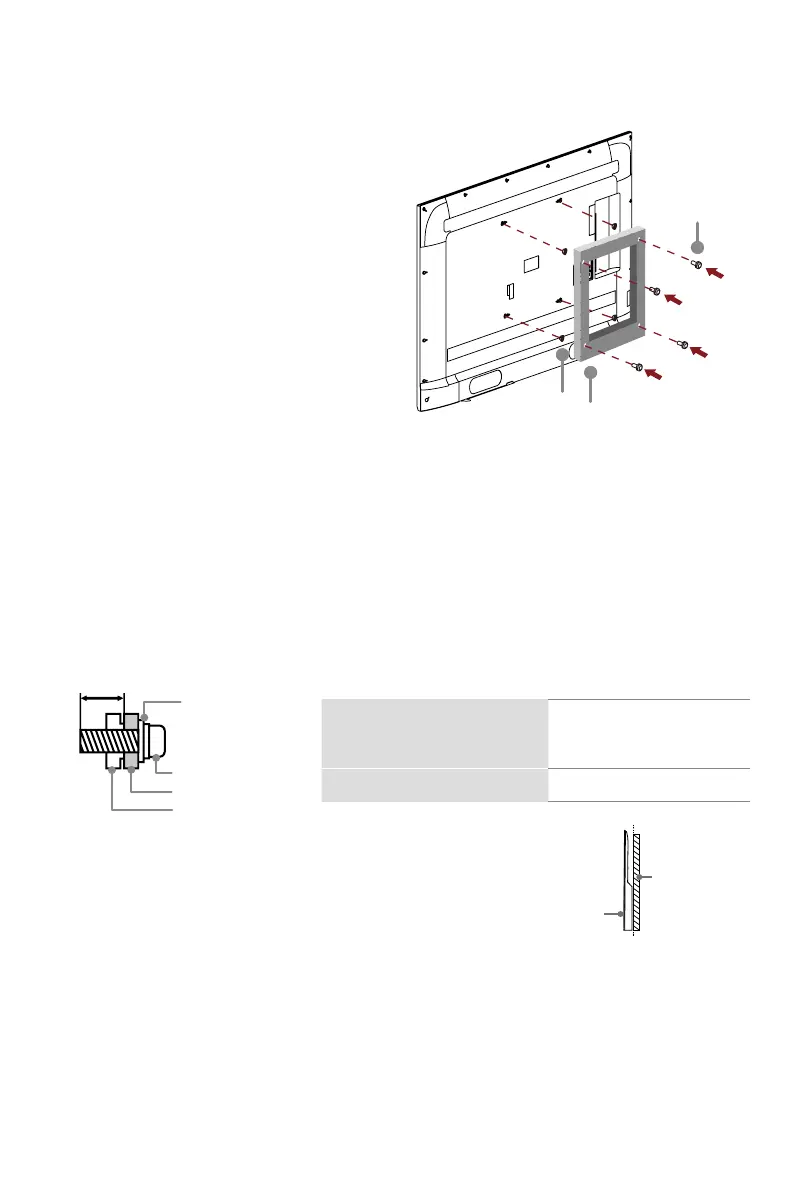
Bracket
(notincluded)
Screw
(notincluded)
Spacer
(notincluded)
Before you begin the third-party
manufacturer instructions, be sure to do the following
things:
Attach the wall mount bracket (not included)
1.
Place the TV face down on a clean, safe
and cushioned surface.
2.
Remove the TV stand if you have already
attached it.
3.
Placespacers(notincluded)inthe
corresponding bracket holes.
CAUTION:
• Follow instructions provided with the wall mount bracket. If it is not correctly mounted,
the TV may fall and cause property damage or personal injury.
• Whenyouattachthemount,besuretousespacers(providedbythethird-party
manufacturer)betweentheTVandthebracket.
• To prevent internal damage to the TV and to ensure it is mounted securely, be sure to
usefixingscrews(notincluded)thatare8.0-10.0mminlengthwhenmeasuredfrom
the attaching surface of the rear cover.
• We do not recommend hanging the TV on a slanted wall, and
TV
screen
Vertical
surface
when wall mounting make sure your television remains
parallel to the wall and does not lean forward.
NOTE:
• If installed on a ceiling or slanted wall, or the television installed is not parallel to the
wall, the television may fall and result in property damage or severe personal injury.
• If you have additional questions, please contact the wall mount manufacturer or the
retailer from which you purchased the TV.
• The diameter and length of the screws differ depending on the wall mount bracket model.
8.0 - 10.0 mm
Wall mount bracket
Screw
Spacer
Rear cover of the TV
Wallmountholepattern(mm)
100 ×200(32")(81.2cm)
200 × 200 (40"/43")
(101.6cm/109.2cm)
Wall mount screw size M6


 To Next Page