4
Step 2. Connect devices to your TV
Check to ensure that you have connected right cables for right ports securely. Loose
connections can affect the quality of the picture image and color.
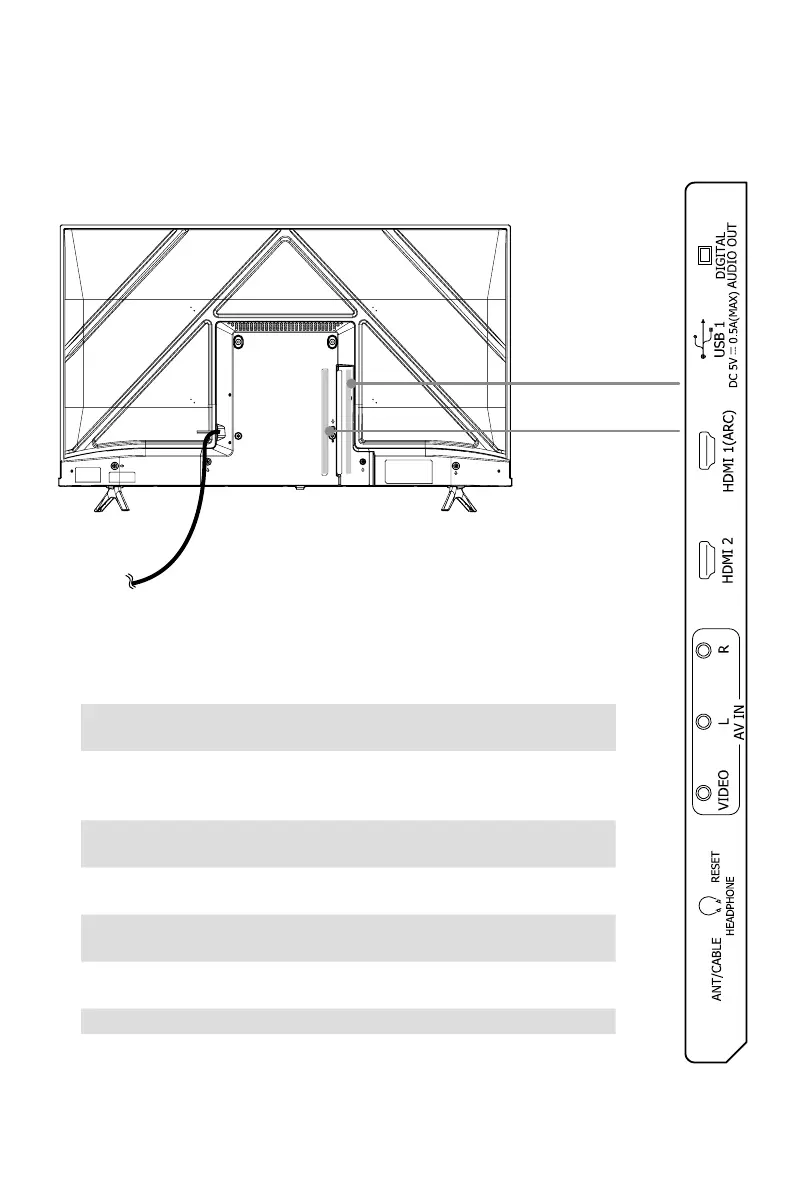
Back View
Power cord
●
DIGITAL AUDIO OUT
:
Connect an optical cable from an external digital
audio system.
●
USB
:
Connect a USB device for browsing photos, music and movies. Hard
disks with a total current consumption or impulse current consumption
greater than 500mA are not supported.
●
HDMI: ConnectaHighDenitionMultimediaInterface(HDMI)cablefrom
an external device.
●
AV IN
:
Connect a composite video cable and left-right audio cables from
an external AV device.
●
RESET
:
Poweroff/restart(quickpress)
ResetyourTVbacktothefactorysetting(longpressfor5seconds)
●
HEADPHONE: Connect headphones to hear audio from the TV. Head-
phones with microphones are not supported.
●
ANT/CABLE: Connect an outdoor VHF/UHF antenna.
(40"/43")
(101.6cm/109.2cm)
(32")(81.2cm)


 To Next Page