Page 11
Select
Network
• The Select Network : Connect your TV to access the
network.
• When the Network Setting menu opens, Hisense Service
Terms and Conditions will appear. Press
◄/►button
to scroll through the pages. Please read it carefully. If
you want to access the Internet, select Agree to set your
network connection for the TV.
Otherwise, select
Disagree
to enter the Channel search
menu.
• You can set up the network conguration in this menu.
For more information, please refer to the section titled
"Network Connection" and "Network Setup" in the user
manual online.
Channel
Search
• Select your Tuner Mode: Antenna or Cable, press
ENTER
button
to conrm.
• Set the Channel Installation: Scan or Skip Scan. If you
select
Scan
, your TV automatically starts Channel
Installation available in your viewing area; If you select
Skip Scan
, your TV does not scan for channels;
Depending on the reception condition, it may take up to
30 minutes or more to complete memorizing channels.
Please allow the process to complete without interruption.
• After the TV has completed scanning for channels, select
Go
to exit the wizard.
NOTE:Ifyouareusingacableorsatelliteboxandyouhave
connectedit totheTVusingacoaxialcable,youshould
selectthe cableoption.Besure thecableorsatellitebox
isturnedonbeforestartingthechannelscan.Ifyouusea
cableorsatelliteboxconnectedtoAV,ComponentorHDMI,
youdon'tneedtoscanforchannels.
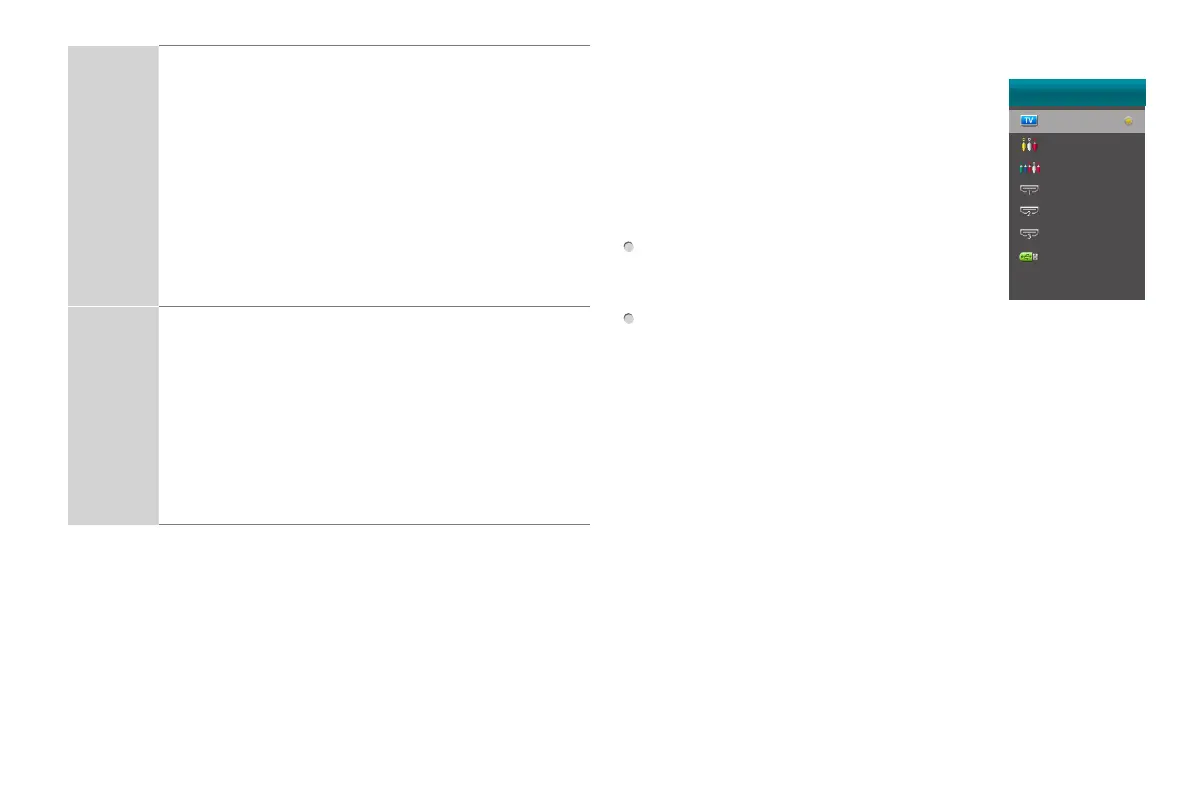
Selecting the Input Source
When you finish the first-time setup, you
must select the TV signal source. Because
your TV stores this information, you do not
need to change the TV signal source unless
it changes. An example of when to do this is
if you change from using an outside antenna
to cable TV.
Turn on your TV, then press
INPUT button
on the remote or on the TV. The INPUT
menu opens.
Press
▲
/
▼
button
to highlight the input source, and then press
ENTER button
.
INPUT
TV
AV
Component
HDMI 1
HDMI 2
HDMI 3
HiMedia



 To Next Page