Page 6
Step 2. Connect Devices to the TV Ports
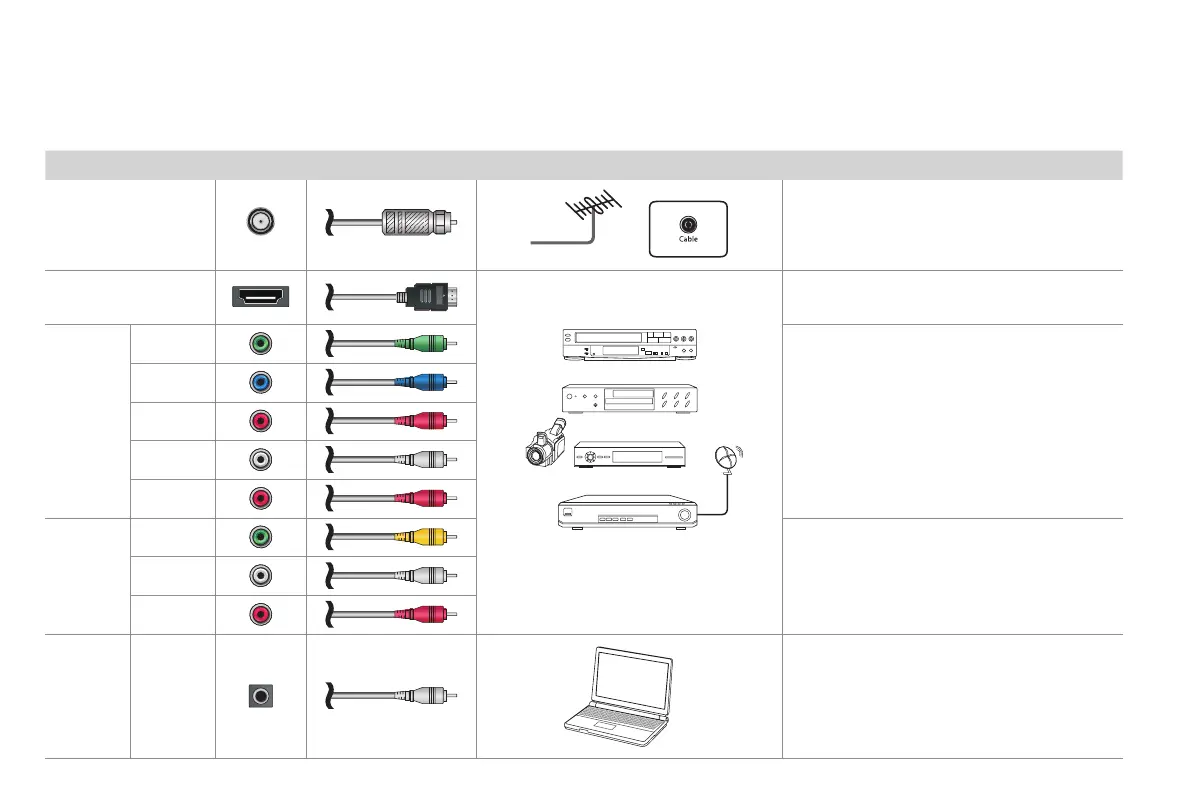
Check to ensure that you have selected the right cables for the ports and that they are connected securely.
TV label Port Cable External Equipment Brief Description
ANT/CABLE
Antenna
VHF/UHF Antenna
ANT OUT
Connect an outdoor VHF/UHF antenna.
HDMI
DVD Player/Recorder
Set-top Box
Satellite Receiver
Satellite
antenna
cable
VCR
Video
Camera
Connect a High Denition Multimedia Inter-
face (HDMI) cable from an external device.
COMPO-
NENT IN
Y
Green
Connect a component video cable and left-
right audio cables from an external AV device.
P
B
Blue
P
R
Red
L
White
R
Red
AV IN
VIDEO
Yellow
Connect a composite video cable and left-
right audio cables from an external AV device.
L
White
R
Red
PC IN
DVI AUDIO
IN
PC
Connect an audio cable from the PC audio
out.


 To Next Page