10
Remote Control
1
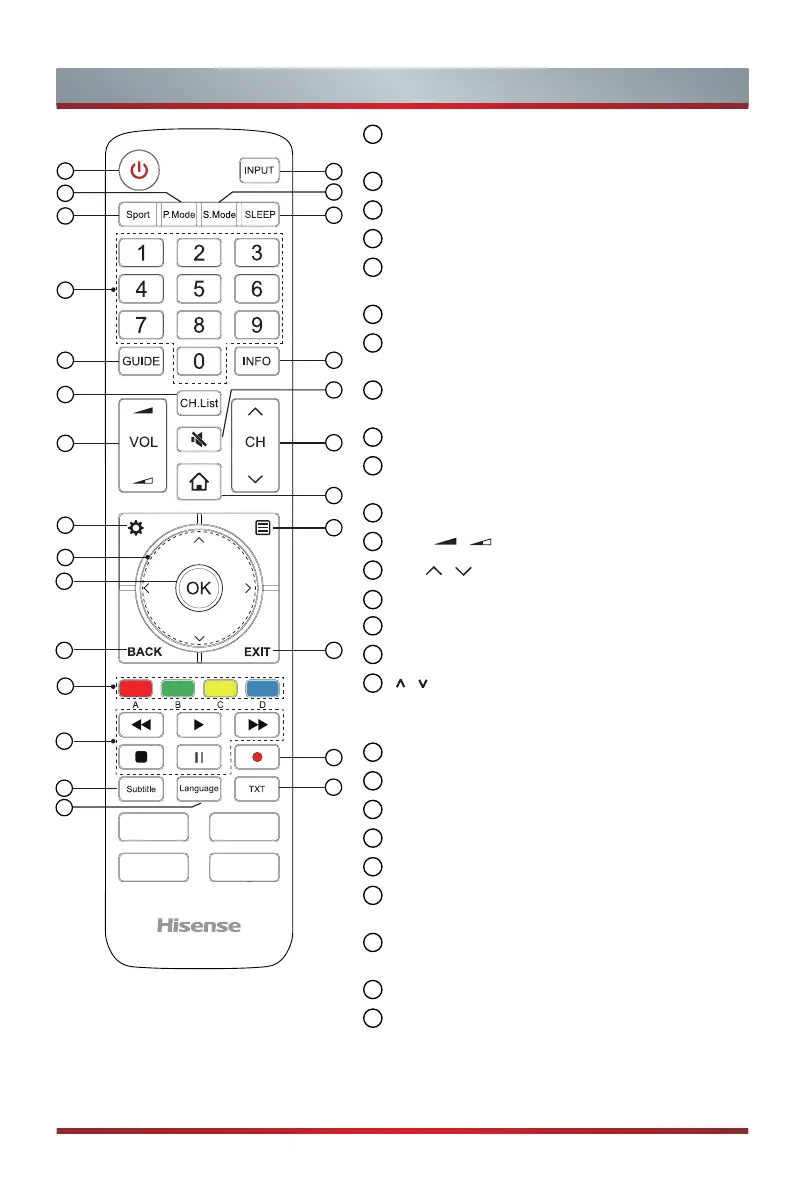
POWER: Switch the TV on or into standby
mode
2
INPUT: Select input sources
3
P.Mode: Picture Mode button
4
S.Mode: Sound Mode button
5
Sport: Enter Sports of
Picture Mode and
Sound Mode
6
SLEEP: Set the sleep timer
7
Channel Number: Direct channel selection or
numbers input
8
GUIDE: Display the Electronic Program Guide
(DTV mode)
9
INFO: Display the present program information
10
CH.List: Display the Channel List on the
screen
11
MUTE: Mute or restore the TV sound
12
VOL / : Adjust the volume
13
CH / : Switch channel
14
HOME: Enter the Smart
15
SETTING: Display the Settings menu
16
Display the Quick setup menu
17
/ / < / >
: Allows you to navigate the OSD
menus and adjust the system settings to your
preference
18
OK: Confirm the selection in the OSD menus
19
BACK: Return to previous menu
20
EXIT: Exit the menu
21
Colour keys for direct selection of options
22
Playback keys
23
PVR: Record the current program
(DTV mode)
24
Subtitle: Activate or deactivate the subtitle
mode
25
TXT: Turn on/off the teletext function
26
Language: Select the audio languages (only
applicable when the TV program has this
feature)
1
5
3
8
12
10
15
18
17
21
20
23
25
22
2
6
9
4
7
13
14
16
19
11
26
24


 To Next Page