2
ENEN
Contents
1. Important Safety Instructions ......................................................................................................... 3
1.1 Safety .........................................................................................................................................................................................................3
1.2 Warning ....................................................................................................................................................................................................4
2. What’s in the Box .............................................................................................................................. 5
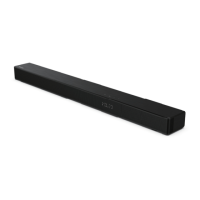
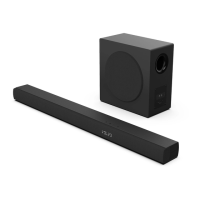
3. Product Diagram .............................................................................................................................. 6
3.1 Main Unit ................................................................................................................................................................................................6
3.2 Wireless Subwoofer ..............................................................................................................................................................................6
3.3 Remote Control .....................................................................................................................................................................................7
4. Preparations ..................................................................................................................................... 7
4.1 Prepare the Remote Control .............................................................................................................................................................7
4.2 Replace the Remote Control Battery .............................................................................................................................................7
4.3 Placement and Mounting ..................................................................................................................................................................8
4.4 Wall Mounting (if using option-B)...................................................................................................................................................8
5. Connections ...................................................................................................................................... 9
5.1 Use the HDMI ARC Socket ..................................................................................................................................................................9
5.2 Use the OPTICAL Socket ..................................................................................................................................................................... 9
5.3 Use the AUX Socket ..............................................................................................................................................................................9
5.4 Connect Power ................................................................................................................................................................................... 10
6. Pair up with the Subwoofer ........................................................................................................... 10
6.1 Automatic pairing ..............................................................................................................................................................................10
6.2 Manual pairing .................................................................................................................................................................................... 10
6.3 Use the Hisense EzPlay Function .................................................................................................................................................. 10
7. Basic Operation .............................................................................................................................. 11
7.1 Standby/ON ......................................................................................................................................................................................... 11
7.2 Auto-Standby / Auto-Wake ............................................................................................................................................................ 11
7.3 Select Modes ....................................................................................................................................................................................... 11
7.4 Adjust the Volume ............................................................................................................................................................................. 11
7.5 Turn the Surround Sound ON/OFF .............................................................................................................................................. 12
7.6 Select Equalizer (EQ) Eect ............................................................................................................................................................. 12
7.7 Adjust the Bass/Treble .....................................................................................................................................................................12
7.8 Adjust the Brightness ....................................................................................................................................................................... 12
7.9 Factory reset ........................................................................................................................................................................................ 12
8. AUX/ OPTICAL/HDMI ARC Operation ............................................................................................ 12
9. USB Operation ................................................................................................................................ 13
10. Bluetooth Operation ...................................................................................................................... 13
11. Troubleshooting ............................................................................................................................. 14
12. Specications.................................................................................................................................. 15



 To Next Page