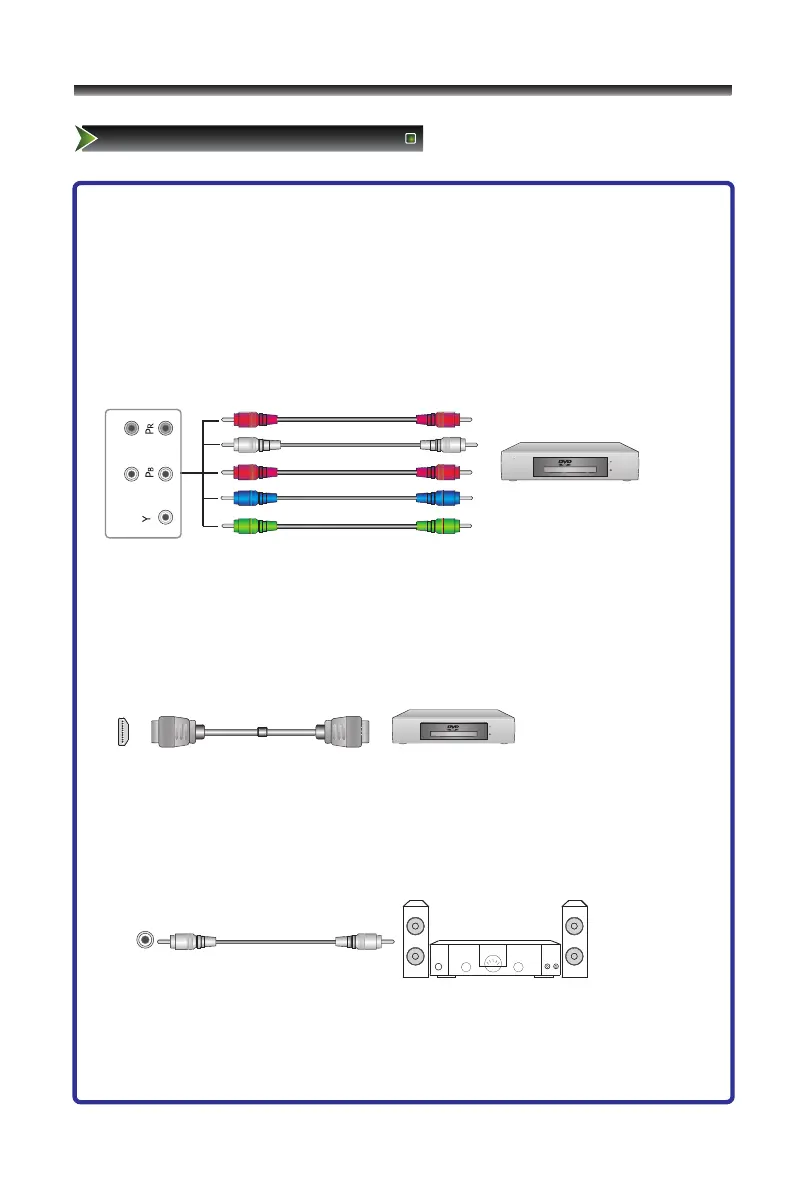
3. Connecting Component Devices (DVD/PVR)
Component video(Y, Pb, Pr)transmits video as separate Y, Pb, Pr signals. Use this
connection for high-definition video signals from a DVD or other equipment.
- Connect Component video and audio cables to Component inputs (“PR/CR”,
“PB/CB”, “Y”) of your set and the other ends to corresponding component
video out connectors on the PVR or DVD.
- The "Y, PB/CB and PR/CR” connectors on your component devices (PVR or DVD)
are sometimes labeled Y, B-Y and R-Y or Y, CB and CR. (Colors for inputs and
cables must correspond on both devices.)
4. Connect to devices with HDMI interface
HDMI:High Definition Multimedia Interface
HDMI transmits an all-digital signal and is the recommended choice for playback
from a digital DVD or DVR. No sound connection is needed for HDMI to HDMI
connection.
- HDMI cable connected to the HDMI connector on the TV.
5. Optical audio
Connect an optical audio device to this jack (Toslink optical cable is needed).
Note: DTV and HDMI output only.
The equipment with HDMI
output jack ( such as DVD
players, set-top boxes, etc.).



 To Next Page